
Migration Manager can omit a Maximo object from a package when a publish channel declares an interface table with the same name. The legacy migration logic classifies that name as an integration table, and integration tables are deliberately excluded from migration.
For example, publish channel MXWOInterface might have an interface table named WORKORDER:
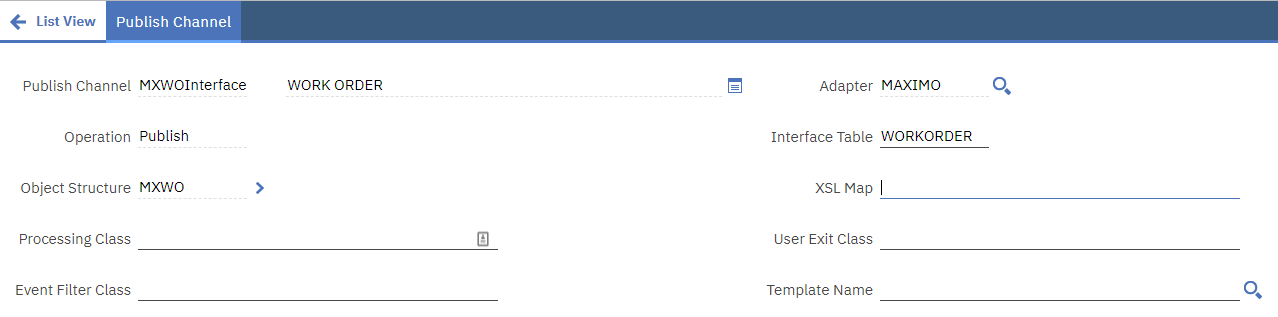
Any package that tries to capture changes to the real WORKORDER Maximo object can then treat the name as an interface table and skip it.
Why Migration Manager excludes the table
IBM documents integration interface tables as a Migration Manager limitation. Their physical definitions are generated from the associated object structure and must be created or regenerated in the target environment. Changes to interface tables and the default or custom integration queue tables are not migrated.
That exclusion is correct for a real interface table. The problem here is the ambiguous name: WORKORDER is also a core Maximo object that the package is expected to carry.
Confirm the collision
Before changing the publish channel:
- Confirm the expected object is absent from the generated package rather than merely unchanged.
- Open Integration → Publish Channels in the source environment.
- Search for the missing Maximo object name in the Interface Table field.
- Check enterprise services as well, because they can also use interface tables.
- Confirm the matching interface table belongs to a remote endpoint or integration and is not the Maximo base table itself.
Do not assume every missing object has this cause. Package definitions, processing actions, event tracking and other documented Migration Manager limitations can also affect package content.
Preferred fix: give the interface table a unique name
The durable fix is to rename the integration table so it cannot collide with a Maximo object. Choose a name that follows the environment's integration naming standard, then coordinate the change with every external system that reads or writes the table.
Changing an interface table can require you to:
- pause the affected publish channel or integration flow
- drain and archive outstanding interface and queue records
- change the Interface Table value on the publish channel or enterprise service
- recreate the interface table through External Systems → Create Interface Tables
- update external consumers, database permissions, polling jobs and monitoring
- validate an end-to-end transaction before resuming processing
IBM warns that recreating an interface table can drop the existing table and lose data. Use Rename Existing where the supported dialog offers it, and retain a separate database backup.
Once the collision is removed, regenerate the Migration Manager package and confirm the Maximo object definition is present.
Temporary package-generation workaround
If the interface table cannot be renamed immediately, the workaround is to clear the colliding Interface Table field in the source environment, generate the migration package, and restore the value afterward.
Use this only during a controlled integration outage:
- Record the publish channel, interface table, endpoint and external-system configuration.
- Stop or disable the affected integration flow and confirm no messages are in flight.
- Clear the colliding Interface Table field and save the publish channel.
- Generate the Migration Manager package that contains the Maximo object change.
- Inspect the package and confirm it contains the intended object definition but does not carry the temporary blank interface-table value.
- Restore the original Interface Table value immediately.
- Re-enable the integration and validate a representative transaction.
The workaround changes live integration metadata and can itself create Migration Manager tracking events. Keep the change window short, record both saves and review the generated package before distribution.
Handle the target environment correctly
Deploying the Maximo object change does not update a remote interface table. If the associated object structure changed, recreate or regenerate its interface table separately in the target environment so its columns reflect the current flat object structure.
Before recreating it:
- resolve object-structure alias conflicts and enable flat structure support
- process or archive queued interface data
- back up the table and confirm the target endpoint
- coordinate downtime with the external consumer
After deployment, compare the Maximo object and interface table independently. They serve different purposes even when the original configuration gave them the same name.
The exact Maximo release used to reproduce the collision is unknown. Verify the behavior in a non-production environment before applying the workaround.