
September is apparently optional
There are plenty of things you expect to troubleshoot in Maximo. Permissions. Workflows. An integration that has developed opinions.
Being able to use the month of September should probably be a given.
Yet here we are: selecting September dates from the lookup produces an error, and suddenly an entire month is unavailable through the very control meant to help you enter it. The workaround is to edit the date Maximo just supplied and add a single letter.
I Barely Manage. Sometimes, only eleven months of the year.
The short answer
The issue and workarounds described here were observed in Maximo Manage 9.1.395.
If selecting a September date from Maximo's calendar produces BMXAA4144E, check the month abbreviation. In the environment described here, the date lookup supplies Sep, but manually changing it to Sept allows the date to be accepted. IBM documents a related Commonwealth English date-picker defect as DT500807, described in the Manage 9.1.25 fix list.
One missing letter. An entire month becomes unacceptable.
The workaround that worked here: change Sep to Sept, keeping the rest of the date/time format intact. For a product fix, check whether DT500807 applies to your installed build and locale; the patches listing that defect are below.
The problem
You open a calendar, select a perfectly reasonable date in September and Maximo objects:
BMXAA4144E - The date/time format is not valid.Which is particularly helpful when Maximo supplied the date itself.
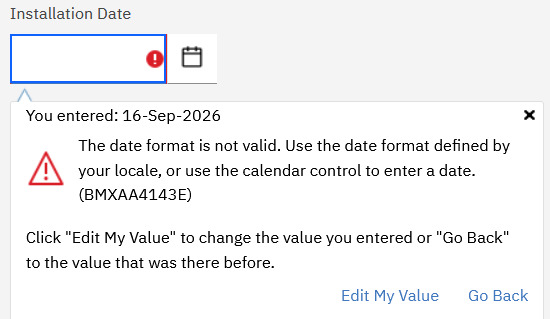
The Installation Date field rejects 16-Sep-2026 and helpfully suggests using the calendar control. The same calendar control that supplied the date. Excellent teamwork.
The screenshot shows the field validation message BMXAA4143E; the date/time error discussed in this post is BMXAA4144E. Keep the exact code when recording the failure, as the screenshot and the date/time error have different message numbers.
The useful clues for this particular defect are:
- The date came from the date picker.
- The user has a Commonwealth English locale.
- September is the month that fails.
- The resulting date text contains
Sep. - Manually changing
SeptoSeptmakes the value acceptable.
IBM's DT500807 summary describes the reverse direction: Sept supplied where Sep is expected. The behaviour observed here is Sep supplied and Sept accepted. The published summary alone does not confirm that this environment has that exact defect. The error code alone does not identify the cause: BMXAA4144E can also occur for other date-format problems.
Why September?
The disagreement is between two textual abbreviations for the same month:
Date lookup supplies:  Sep
Accepted after edit:   Sept
For a human, the meaning is obvious. For a parser expecting a particular month token, that extra t matters.
This explains the apparently seasonal failure: the mismatch concerns September's abbreviation. It does not mean that September dates are inherently invalid, or that the database has decided autumn is unsupported.
The general lesson is that a displayed date is still a formatted string. The part producing that string and the part reading it need to agree on the format and locale. A calendar control can produce a real date in a representation the receiving code rejects.
IBM's published defect summary identifies the abbreviation mismatch. It does not establish which underlying library or runtime change introduced it, so blaming a particular Java or browser upgrade would need further evidence.
Getting past it while you arrange the update
In a non-production record, enter the same September date with Sept in place of Sep, if the field permits manual editing. Preserve the day, year, separators and any time component required by that field.
If the edited value is accepted, save and reopen the record to check that the intended date and time were retained. Also check whether opening the calendar again reintroduces Sep.
A second temporary workaround to try is changing setting.DISPLAYDATE from dd-MMM-yyyy to dd-MM-yyyy:
Before: dd-MMM-yyyy  →  16-Sep-2026
After:  dd-MM-yyyy   →  16-09-2026
MMM uses an abbreviated month name; MM uses a numeric month. That removes the Sep versus Sept disagreement from the displayed date. Keep the day and year portions unchanged, and verify that the affected field accepts, saves and reopens the intended September date after the setting takes effect. Record the original setting so you can restore it after the underlying issue is resolved.
This configuration workaround needs verification in your environment. Do not assume that a different numeric format such as 09/10/2026 means the same thing for every user. Swapping a visible validation error for the wrong saved date would be a very Maximo way to improve the situation.
Take September to Ireland
Another workaround that resolved the issue in the reported environment was changing the affected user's locale to Ireland (en_IE). Save the profile change, start a fresh session if necessary, then select a September date from the lookup and check that it saves and reopens correctly. Record the original locale before changing it.
Why would that help? A locale controls regional formatting conventions, not just the language of the interface. IBM explains that Maximo's date display can depend on the user's profile locale. Month names and abbreviations are also locale data, as described in the Unicode date-format specification.
The likely explanation is that selecting Ireland changes the date-formatting or parsing conventions enough for the lookup's value to be accepted. That is an inference from the successful workaround, rather than a confirmed explanation of the internal code path. Without comparing the generated date text and the parser's expectations under both locales in this installation, we cannot say whether Ireland changes the abbreviation, the date pattern or another part of the locale handling.
Check other date and number fields before adopting the change more widely, since the locale affects more than September. Treat it as a temporary user-level workaround rather than a product fix.
Apparently September is available. You just have to take it to Ireland first.
The issue and workarounds above apply to the reported Maximo Manage 9.1.395 environment. Recheck the behaviour in your own installation before applying a workaround more widely.
The related IBM fix
IBM lists DT500807 in these Manage Operator patches:
| Release branch | Patch listing the fix |
|---|---|
| 9.0 | 9.0.32 |
| 9.1 | 9.1.25 |
| 9.2 | 9.2.4 |
Confirm with IBM whether DT500807 covers your observed behaviour, given the reversed abbreviations in its summary. If it applies, use the supported update path for your release branch and confirm that the target update includes DT500807. These are documented fix levels, not a claim that every earlier version is affected.
After updating, repeat the original action using the affected user's locale. Select a September date from the calendar, save the record and reopen it. Include a date/time field if that was where the problem occurred, and compare with another month.
If September still refuses to cooperate
Capture the exact value being rejected, the user's locale, the field and application, and the installed Manage build. Record whether the failure happens after calendar selection, manual entry or an integration request.
If changing Sep to Sept does not help, or the failure also affects unrelated months, broaden the investigation. IBM has a separate BMXAA4144E import troubleshooting note; an import failure needs checking against its own input-format requirements.
In the case described here, the argument is wonderfully small: the lookup says Sep, Maximo accepts Sept, and you get to spend your afternoon supplying the missing t.
I Bicker over Months. Do you?