
A new Maximo organization is inactive by default. If it appears to vanish after you save it, the organization probably still exists: your user cannot see the inactive site attached to it.
Maximo filters access to inactive sites through the Can Access Inactive Sites setting on the user record. Administrators need that access while setting up or decommissioning sites.
Confirm this is the problem
Before changing security, check the simple causes:
- Clear any filters in the Organizations application.
- Confirm that the organization was saved successfully.
- Check whether its organization and site are still inactive.
- Confirm that another administrator with inactive-site access can find it.
If the organization is active, investigate ordinary site authorization, data restrictions and application security instead. The setting in this article only changes access to inactive sites.
Grant temporary inactive-site access
An administrator with access to the Users application should:
- Open Security → Users.
- Find the user who must finish configuring the new organization.
- Select Can Access Inactive Sites under the user settings.
- Save the user record.
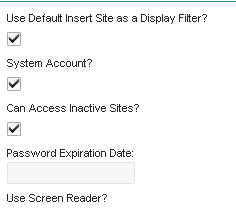
Sign out completely and sign back in so the new setting is included in the user's session. Reopen Organizations and search for the new record.
This permission does not replace application access or authorized-site security. The user still needs permission for the Organizations and Chart of Accounts applications and access to the relevant organization and site.
Finish activating the organization
Do not activate a new organization only to make it visible. Complete its required setup first. The exact sequence depends on the release, but normally includes:
- Verify the item set, company set and base currency selected when the organization was created.
- Configure the GL components and create the required accounts in Chart of Accounts.
- Set the organization's clearing account.
- Activate the organization.
- Activate each site that is ready for use.
- Add the site to the appropriate security groups and user defaults.
- Test record creation with a normal user assigned to that site.
IBM notes that organizations are inactive when first created and require a clearing account before activation. Activation affects where operational and financial records can be created, so it should follow the implementation plan rather than being used as a visibility workaround.
Remove access when it is no longer required
Can Access Inactive Sites expands what the user can administer. Grant it only to people responsible for setting up or decommissioning sites. If the access was temporary, clear the option after activation and have the user sign out and back in again.
If the inactive organization remains missing after a fresh login, verify the user's security groups, authorized sites, conditional data restrictions and application filters. Also test with a known administrative account to separate a record problem from a user-specific security problem.
The exact Maximo release used for this procedure is unknown. Verify the behavior on your installed release.