
Maximo can reject a GL component length greater than 20 even when the organization's account structure needs a longer segment:
BMXAA4049E - The value specified exceeds the maximum field length that is
allowed for this attribute. Value = 25, Object Name=GLCONFIGURE,
Attribute Name=GLLENGTH, Maximum Length=12.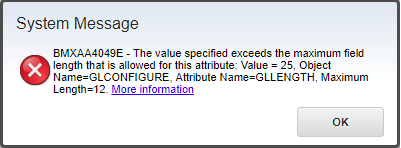
The example environment accepted component lengths up to 20 despite the message reporting 12. To configure a longer component, increase the Maximo attributes that store component values first, apply the database change, and only then change the GL account structure.
GL accounts feed financial transactions, integrations, reports and external accounting systems. Take a database backup, document every organization's current structure, and test the complete financial flow outside production. Increasing a column is straightforward; changing the contract expected by downstream systems is not.
Inventory the current account structures
Before changing metadata, record the system-level structure and each organization's override:
- component name, order, type, length and delimiter;
- whether the component is required;
- the longest value already stored;
- the total rendered account length, including delimiters; and
- every integration, report, interface table and external system that consumes GL accounts.
The system-level structure must accommodate the longest structure used by any organization. Confirm that the target accounting system accepts the proposed component and complete account lengths.
You can use this read-only query to review the principal Maximo attributes involved:
SELECT
  OBJECTNAME,
  ATTRIBUTENAME,
  MAXTYPE,
  LENGTH,
  SAMEASOBJECT,
  SAMEASATTRIBUTE
FROM
  MAXATTRIBUTE
WHERE
  (
    OBJECTNAME = 'GLCOMPONENT'
    AND ATTRIBUTENAME = 'COMPVALUE'
  )
  OR (
    OBJECTNAME = 'CHARTOFACCOUNTS'
    AND ATTRIBUTENAME LIKE 'GLCOMP%'
  )
  OR (
    SAMEASOBJECT = 'GLCOMPONENT'
    AND SAMEASATTRIBUTE = 'COMPVALUE'
  )
ORDER BY
  OBJECTNAME,
  ATTRIBUTENAME;
Use the result as an inventory only. Make supported metadata changes through Database Configuration rather than updating MAXATTRIBUTE directly.
Increase GLCOMPONENT.COMPVALUE
Open System Configuration → Platform Configuration → Database Configuration, find the GLCOMPONENT object, and open its Attributes tab.
Change the length of COMPVALUE to the largest component length the system must support. The example used 30 characters:
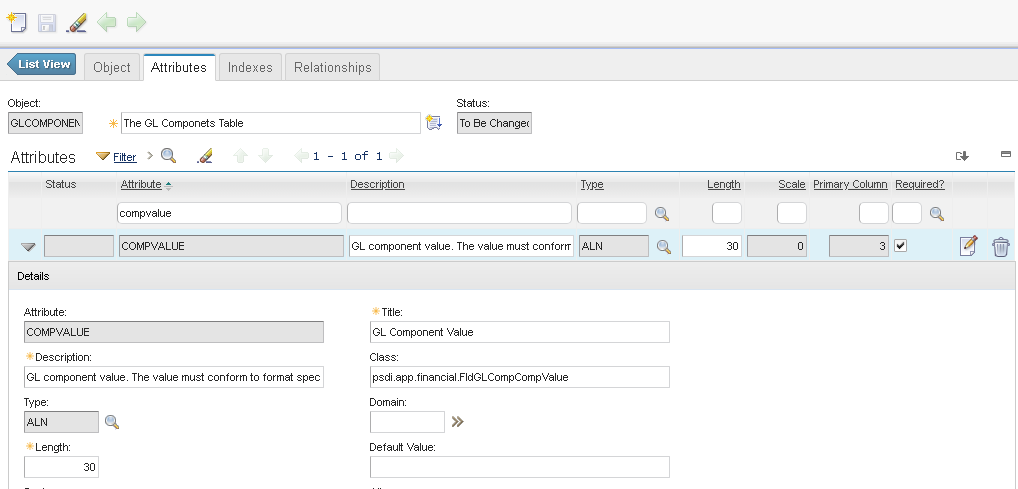
Increasing this attribute raises the limit for stored GL component values. It does not by itself change an organization's account format.
Increase the CHARTOFACCOUNTS component attributes
Open the CHARTOFACCOUNTS object and review GLCOMP01, GLCOMP02, and every additional GLCOMPxx attribute used by an account structure in the environment.
Set each used attribute to at least the maximum length required for the component position it stores. The example system uses three components and raised GLCOMP01, GLCOMP02, and GLCOMP03 to 30:
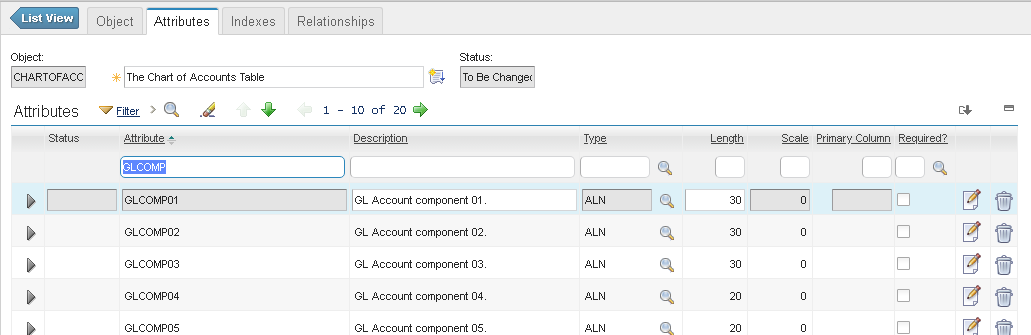
Do not assume the environment only uses the components visible in one organization. Check every organization and any same-as attributes returned by the inventory query. Keep same-as relationships aligned so a shorter dependent attribute cannot truncate or reject the longer value later.
Apply the database configuration
Save the changes, turn on Admin Mode, and apply the database configuration using the procedure for your release. Review the configuration log and confirm that every changed attribute completed successfully before turning Admin Mode off.
Rerun the inventory query against the active metadata and verify the physical database columns with the database administrator. If one attribute remains shorter than its metadata or its related component, stop before changing the GL structure.
Change the GL account configuration
Return to Database Configuration and select GL Account Configuration. Increase the required component length, preserving its type, order, required flag and delimiter unless those values are part of the approved design.
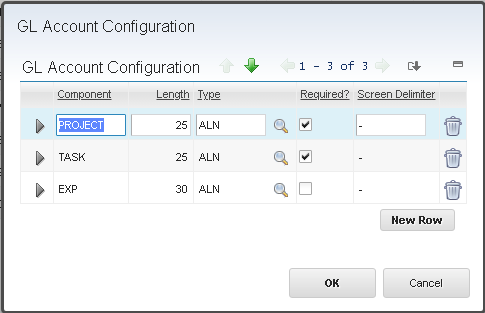
For organization-specific formats, open Chart of Accounts → Add/Modify Account Structure and confirm that each organization uses a compatible length. Maximo treats a component length as a maximum; shorter values do not need padding.
Validate the change
Create a disposable component value longer than 20 characters and test it through the same paths used in production:
- Add the value in GL Component Maintenance.
- Build and save a complete GL account containing it.
- Use the account on a representative purchasing, inventory and work transaction.
- Query the saved record and confirm that no component or concatenated account was truncated.
- Export and import the account through each relevant integration.
- Run affected reports and financial extracts.
- Check field layouts, lookups and validation on applications that display GL accounts.
Changing a maximum length does not repair existing invalid components, and shortening a component later can invalidate existing accounts. Preserve the previous metadata and account structures as the rollback plan; restoring them is safe only if no values longer than the old limit have been introduced.
The exact Maximo release and database platform used for this procedure are unknown. IBM's support record covers the same over-20 configuration across several legacy Maximo releases, but verify the dependent attributes and supported total account length for the release you operate.