
Changing the context root is a useful way to make development, test and production environments easy to distinguish. Instead of every environment using /maximo, a development system can use /dev/maximo and make its identity obvious in the URL.
This procedure covers the traditional Maximo installation layout used by older Maximo Asset Management releases. It changes the applications packaged in maximo.ear and, when installed, the separate maximo-x.war used by Work Centers. It does not describe Maximo Manage running in Maximo Application Suite.
Before you begin: changing a context root changes public application URLs. Back up the edited files and deployment artifacts, schedule an outage and inventory integrations, reverse-proxy routes, SSO callbacks, bookmarks and monitoring checks that contain the old paths.
The example uses these mappings:
| Application | Original | Development |
|---|---|---|
| Maximo user interface | /maximo |
/dev/maximo |
| Business Objects web | /mbo |
/dev/mbo |
| Enterprise Adapter web | /meaweb |
/dev/meaweb |
| REST services | /maxrest |
/dev/maxrest |
| Work Centers | /maximo-x |
/dev/maximo-x |
Use paths that match your own naming and routing conventions.
Back up the EAR descriptors
Back up these files before editing them:
<install-root>\SMP\maximo\applications\maximo\META-INF\application.xml
<install-root>\SMP\maximo\applications\maximo\META-INF\deployment-application.xml
Keep the backups outside the application source tree so they cannot be included accidentally when you rebuild the EAR.
Update application.xml
Open application.xml and find the web modules for maximouiweb, mboweb, meaweb and maxrestweb. Change only their context-root values:
<module>
  <web>
    <web-uri>/maximouiweb/webmodule</web-uri>
    <context-root>/dev/maximo</context-root>
  </web>
</module>

<module>
  <web>
    <web-uri>/mboweb/webmodule</web-uri>
    <context-root>/dev/mbo</context-root>
  </web>
</module>

<module>
  <web>
    <web-uri>/meaweb/webmodule</web-uri>
    <context-root>/dev/meaweb</context-root>
  </web>
</module>

<module>
  <web>
    <web-uri>/maxrestweb/webmodule</web-uri>
    <context-root>/dev/maxrest</context-root>
  </web>
</module>
Leave each web-uri unchanged. It identifies the module being packaged; the context-root controls the URL used to reach it.
Update deployment-application.xml
Open deployment-application.xml and apply the same four paths to the packaged WAR definitions:
<!-- List of Web application modules -->
<module id="WebModule_1077124925258">
  <web>
    <web-uri>maximouiweb.war</web-uri>
    <context-root>/dev/maximo</context-root>
  </web>
</module>

<module id="WebModule_1077124925257">
  <web>
    <web-uri>mboweb.war</web-uri>
    <context-root>/dev/mbo</context-root>
  </web>
</module>

<module id="WebModule_1077124923835">
  <web>
    <web-uri>meaweb.war</web-uri>
    <context-root>/dev/meaweb</context-root>
  </web>
</module>

<module id="WebModule_maxrest">
  <web>
    <web-uri>maxrestweb.war</web-uri>
    <context-root>/dev/maxrest</context-root>
  </web>
</module>
The module IDs can differ between installations. Match modules by their web-uri rather than copying an ID from this example.
Rebuild and redeploy the Maximo EAR using the process for your installation. The example user interface is then available at:
https://<hostname>:<port>/dev/maximoConfirm that the old path no longer routes unexpectedly and that the UI, integration endpoints and REST services all respond on their new paths.
Point Work Centers at the new Maximo path
If the environment includes Work Centers, update:
<install-root>\SMP\maximo\applications\maximo-x\script\config.jsonChange defaultcontext from:
"defaultcontext": "/maximo",to:
"defaultcontext": "/dev/maximo",Without this change, Work Centers can open to a blank page because they cannot resolve Maximo resources at the expected path. IBM's Work Centers deployment guidance confirms that defaultcontext must follow a changed Maximo context root.
Change the Work Centers context root
Back up and open:
<install-root>\SMP\maximo\applications\maximo-x\WEB-INF\ibm-web-ext.xmlChange:
<context-root uri="/maximo-x" />to:
<context-root uri="/dev/maximo-x" />Rebuild maximo-x.war from the deployment directory and redeploy it. The Work Centers URL in this example becomes:
https://<hostname>:<port>/dev/maximo-xUpdate the related system properties
In System Properties, set mxe.x_context to the new Work Centers context root and apply a live refresh:
/dev/maximo-x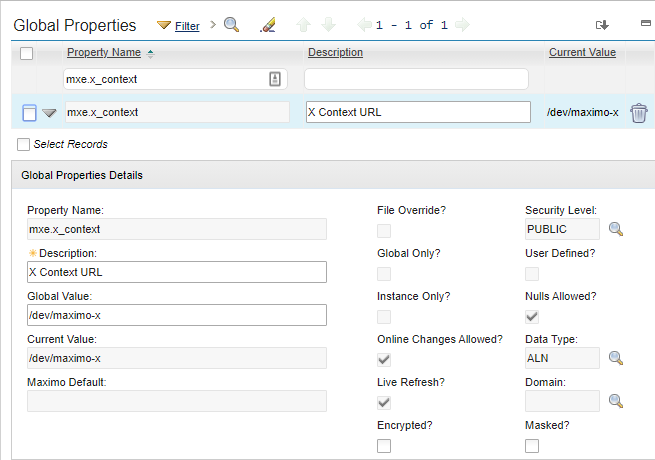
Also review mxe.oslc.webappurl and mxe.oslc.restwebappurl. Their full URLs must contain the new Maximo and REST paths. These properties are used when Work Centers follow URLs returned by OSLC requests.
Test every route that knows the old path
Changing the descriptors is only part of the job. Test:
- Maximo login, logout and session-expiry redirects;
- Work Centers login and navigation;
- REST and OSLC requests;
- inbound and outbound integrations;
- SSO, load-balancer and reverse-proxy rules; and
- mobile, Spatial and other connected products.
Hard-coded context roots have caused product-specific faults. For example, IBM recorded an Anywhere 7.6.4 Spatial problem when Maximo used a context other than /maximo. Check the support information for every installed add-on before treating the change as complete.