
A separate database account is useful when a reporting tool needs to query Maximo without changing its data. I now manage that access through a DB2 role called MAXIMO_RO. The table privileges belong to the role, and each approved reporting user receives the role.
This is easier to maintain than generating the same grants for every user. It also gives you one permission set to review when reporting access changes.
This example uses a Linux account named testro, a database alias named MAXDB76 and a Maximo schema named MAXIMO. Replace all three with values from your environment.
Check the complete authorization path. DB2 users can inherit privileges from groups, roles and
PUBLIC. AssigningMAXIMO_ROdoes not make an account read-only if another path already gives it write or administrative access.
Create the account
The example environment uses DB2's operating-system authentication, so the user first had to exist on the Linux database server:
sudo useradd --no-create-home testro
sudo passwd testro
--no-create-home is the long form of the original -M option. A database service account does not normally need an interactive home directory.
Do not create a local account if your DB2 instance authenticates through LDAP, Kerberos or another security plug-in. Ask the identity administrator to create the account through that system instead. Use a managed secret and follow the site's password-rotation policy.
Create the read-only role
Connect as an authorization ID that can create roles and grant database and table privileges. Create the role once, then allow it to connect to the database:
CONNECT TO MAXDB76;

CREATE ROLE MAXIMO_RO;

GRANT CONNECT ON DATABASE
  TO ROLE MAXIMO_RO;
Many DB2 databases grant CONNECT to PUBLIC, but granting it to the role records the role's requirements explicitly. Skip CREATE ROLE on later runs because MAXIMO_RO already exists.
Generate the role grants
Use MAXOBJECT to generate one statement for every persistent Maximo object. The current version targets the role rather than an individual user:
SELECT
  'GRANT SELECT ON TABLE MAXIMO.' || RTRIM(OBJECTNAME) ||
    ' TO ROLE MAXIMO_RO;'
FROM
  MAXIMO.MAXOBJECT
WHERE
  PERSISTENT = 1
ORDER BY
  OBJECTNAME;
Run the query as a Maximo schema owner or another suitably authorized ID. It returns SQL; it does not apply the privileges itself.
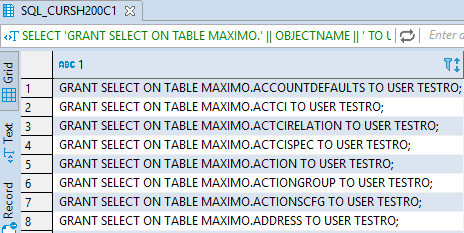
The user-specific version shown above generates grants directly for TESTRO. Using TO ROLE MAXIMO_RO makes the output reusable for every reporting user.
From a Linux DB2 command window, save the generated statements to a file:
db2 -x "SELECT 'GRANT SELECT ON TABLE MAXIMO.' || RTRIM(OBJECTNAME) || ' TO ROLE MAXIMO_RO;' FROM MAXIMO.MAXOBJECT WHERE PERSISTENT = 1 ORDER BY OBJECTNAME" > maximo_ro_grants.sqlOpen maximo_ro_grants.sql and review it before running anything. Its statements should look like this:
GRANT SELECT ON TABLE MAXIMO.ASSET
  TO ROLE MAXIMO_RO;
Run the reviewed file through the DB2 command-line processor:
db2 -tvf maximo_ro_grants.sqlCheck the output for failed statements rather than assuming the whole file succeeded. If the reporting role also needs non-Maximo tables or database views, add only the approved objects to the file before running it.
Assign the role to users
Grant the completed role to each approved reporting account:
GRANT ROLE MAXIMO_RO
  TO USER TESTRO;
Adding another reporting user now requires one role grant rather than regenerating every table grant. Revoking the role removes the permissions supplied through MAXIMO_RO:
REVOKE ROLE MAXIMO_RO
  FROM USER TESTRO;
Test the account
Connect using the reporting account and prove both sides of the permission boundary:
db2 connect to MAXDB76 user testro using 'PASSWORD'Use an interactive password prompt or your reporting tool's secret store where possible so the password does not remain in shell history.
Confirm that a representative read works:
SELECT WONUM, STATUS
FROM MAXIMO.WORKORDER
FETCH FIRST 1 ROW ONLY;
Then confirm that an attempted write is rejected. Use a controlled test environment or a transaction that you can roll back; do not experiment against production data.
Finally, review the effective privileges inherited through the user's groups, roles and PUBLIC. The account should not hold database authorities such as DBADM or DATAACCESS, nor table privileges that allow changes.
Keep access current
The role contains grants only for objects that exist when the generated statements run. Creating a new persistent Maximo object or adding another reporting view does not automatically add it to MAXIMO_RO. Regenerate the file, review it and run it after database configuration changes. Existing grants are harmless to repeat, while new statements bring the role up to date.
The generator only adds privileges. Revoke SELECT separately when a table is no longer approved for reporting, and periodically compare the role's effective privileges with the agreed reporting scope.