
As a Maximo DB2 database changes, table data can become disorganized and optimizer statistics can become stale. REORG and RUNSTATS address those different problems:
REORGreorganizes the physical data and indexes for a table.RUNSTATScollects statistics that the DB2 optimizer uses to choose access plans.
This procedure generates a command for every persistent, non-view Maximo object. Review the generated files before running them: MAXOBJECT describes Maximo objects, but your database may also contain integration, product-addon or custom tables that need their own maintenance plan.
Plan the maintenance window
The example uses a classic table reorganization with ALLOW NO ACCESS. Each table is unavailable while its reorganization runs, and the work can consume substantial temporary space, transaction-log capacity and I/O. Stop Maximo and integrations, take or verify a recoverable backup, confirm free space, and arrange a maintenance window before proceeding.
Run the commands as a DB2 account with the required database authorities. Replace the example instance, database and schema names with values from your environment.
Connect to DB2
If your operating procedure requires an explicit instance attachment, attach to the instance first:
db2 attach to devinst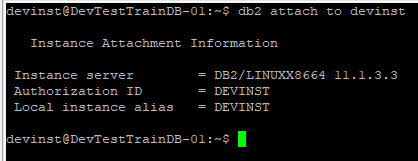
An attachment is used for instance-level commands and is not required merely to execute SQL against a local database in every environment. The database connection is required:
db2 connect to maxdev76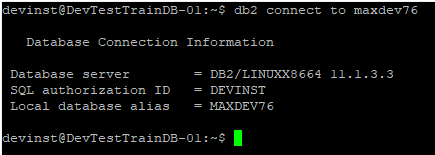
Confirm the target database and current authorization ID before continuing. Running a generated maintenance script against the wrong database is an impressively efficient way to ruin a maintenance window.
Generate the REORG script
Run the reorganization before collecting final statistics. This query generates a classic offline reorganization for every persistent Maximo object that is not a view:
SELECT
  'REORG TABLE MAXIMO.' || OBJECTNAME || ' CLASSIC ALLOW NO ACCESS;'
FROM MAXIMO.MAXOBJECT
WHERE PERSISTENT = 1
  AND ISVIEW = 0
ORDER BY OBJECTNAME;
From the DB2 command line, use -x to omit column headings and -t to treat semicolons as statement terminators, then redirect the output to reorg.sql:
db2 -xt "SELECT
  'REORG TABLE MAXIMO.' || OBJECTNAME || ' CLASSIC ALLOW NO ACCESS;'
FROM MAXIMO.MAXOBJECT
WHERE PERSISTENT = 1
  AND ISVIEW = 0
ORDER BY OBJECTNAME;" > reorg.sql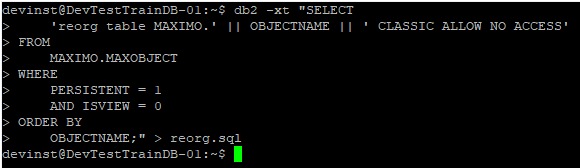
Open reorg.sql before executing it. Check the schema, make sure the file contains only valid REORG statements, and remove any table that should not be processed in this window. You can then run the reviewed file with verbose output:
db2 -tvf reorg.sqlCapture the output and stop to investigate any failed statement. Do not assume that later commands repaired an earlier failure.
Generate the RUNSTATS script
Once the reorganizations finish successfully, generate statistics for the tables and all their indexes:
SELECT
  'RUNSTATS ON TABLE MAXIMO.' || OBJECTNAME || ' AND INDEXES ALL;'
FROM MAXIMO.MAXOBJECT
WHERE PERSISTENT = 1
  AND ISVIEW = 0
ORDER BY OBJECTNAME;
Generate runstats.sql from the command line:
db2 -xt "SELECT
  'RUNSTATS ON TABLE MAXIMO.' || OBJECTNAME || ' AND INDEXES ALL;'
FROM MAXIMO.MAXOBJECT
WHERE PERSISTENT = 1
  AND ISVIEW = 0
ORDER BY OBJECTNAME;" > runstats.sql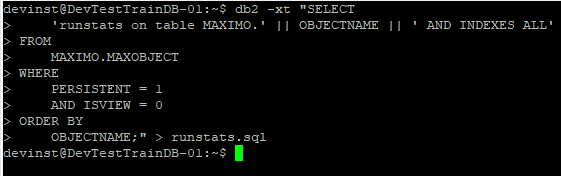
Review the generated file just as carefully, then execute it:
db2 -tvf runstats.sqlVerify and clean up
Review both command logs for DB2 errors. Check the operational tools your DB2 release provides for reorganization recommendations and statistics timestamps, then start Maximo and integrations and test representative queries. A successful command does not by itself prove that every application workload improved.
Regenerate these files during the next maintenance window so newly added Maximo objects are included. Once the logs have been retained somewhere appropriate, remove the temporary scripts:
rm reorg.sql runstats.sql
For regular production maintenance, use a tested DB2 maintenance policy rather than blindly reorganizing every Maximo table on a fixed schedule. DB2 can identify tables that need attention, and a targeted plan usually creates less disruption than an unconditional full-schema reorganization.