
Sending a higher Job Plan revision number through a legacy Maximo Integration Framework interface can create a new record without following the same revision path as the Revise Job Plan action. Related data copied by the application revision API, such as attachments, can therefore be missing.
An inbound object structure script can call JOBPLAN.revise() before MIF applies the incoming changes. The script then replaces the revision number in the message so normal inbound processing targets the revision it just created.
Treat this as a version-specific customization. First test the supported Job Plan integration behaviour on your installed fix pack or Manage release. If the native API now preserves all the related data you require, use it without this script.
Understand the transaction
The application revision process has a defined lifecycle:
- The source Job Plan must be active.
- Maximo duplicates it with the same Job Plan number.
- Maximo increments the revision number.
- The new revision starts in pending-revision status.
- The original remains active until the new revision is activated.
Activating the new revision later moves the old active revision to revised status. Existing work orders keep the revision already applied to them.
The customization in this article performs steps 2–4, then lets MIF update the pending revision. It does not activate the revision automatically.
Configure the object structure
Create or clone an object structure containing:
JOBPLANas the root object.PLUSCJPREVINPUTas a child object for revision input.- Any Job Plan child objects that the interface is allowed to update.
Set the inbound processing class to:
psdi.iface.mic.StatefulMicSetInThe stateful processing class handles status changes made through the interface.
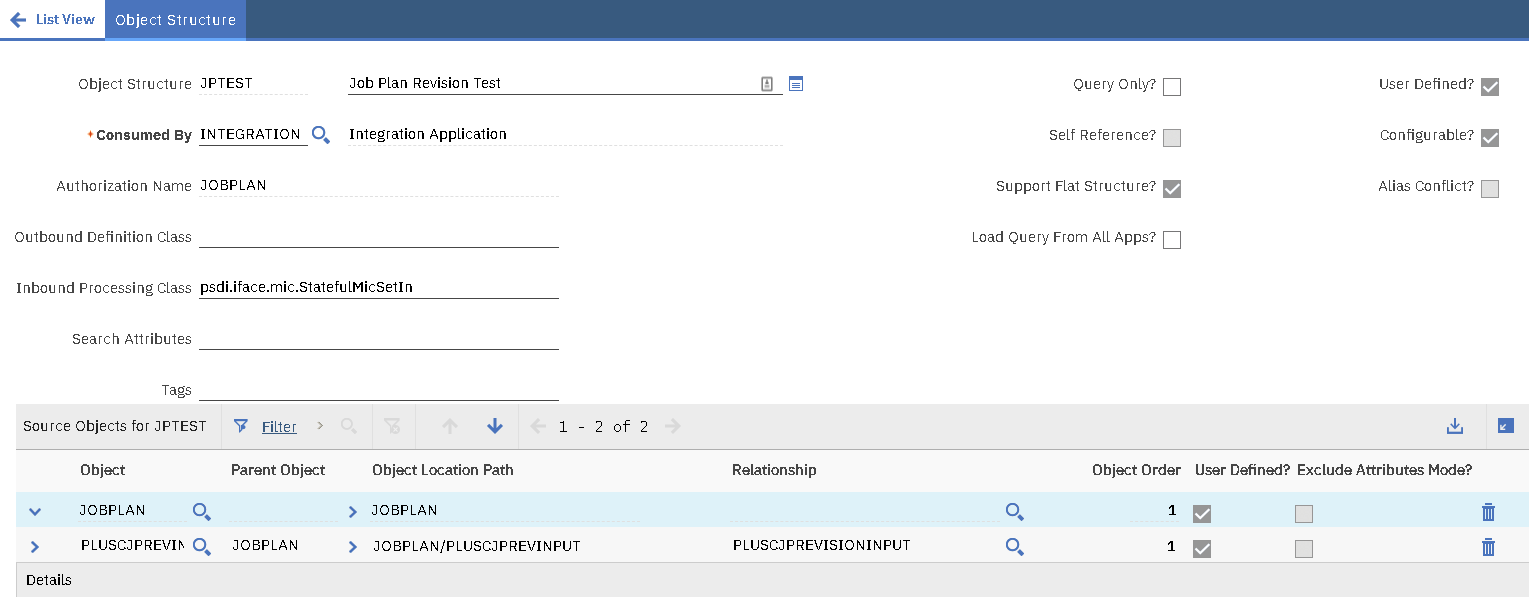
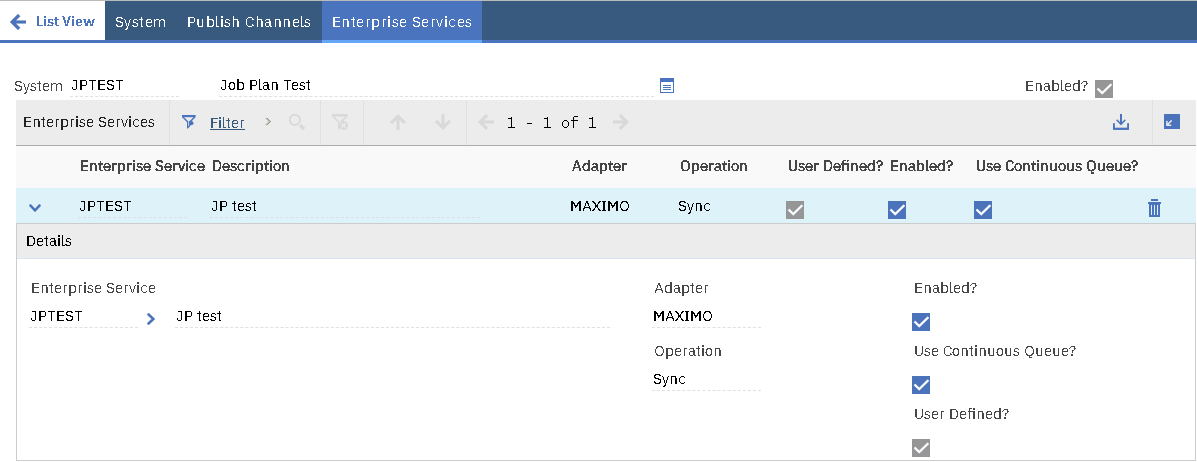
Apply an object structure security model and exclude fields the integration must never set. Add the object structure to an enterprise service and external system; the example names both components JPTEST:
Create the inbound integration script
In Automation Scripts, select Create > Script for Integration, choose Object Structure, select the Job Plan object structure and set the direction to Inbound Processing.
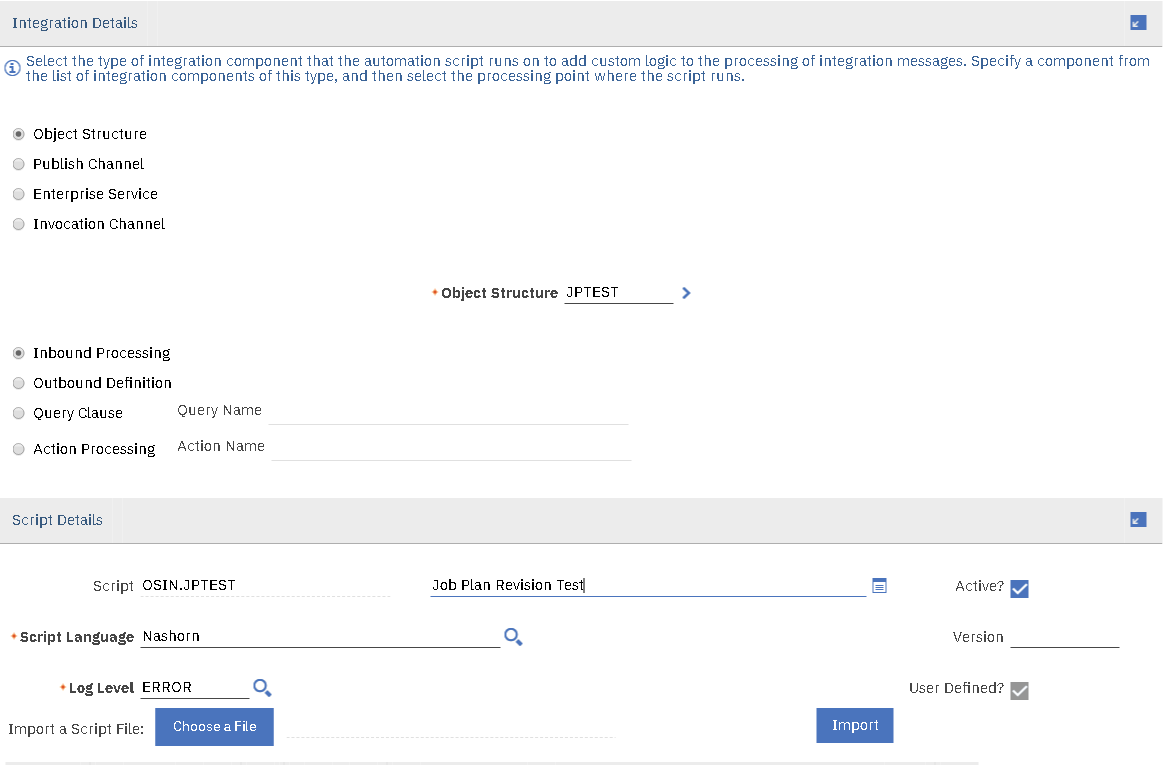
The script runs in beforeProcess(ctx), before MIF creates or updates the MBOs represented by the message.
Use a bounded, parameterized lookup
The script binds message values, handles system-, organization- and site-level Job Plans, rejects ambiguous matches and closes the MBO set.
var MXServer = Packages.psdi.server.MXServer;
var SqlFormat = Packages.psdi.mbo.SqlFormat;

function textValue(data, attribute) {
  return String(data.getCurrentData(attribute) || "").trim();
}

function requiredValue(data, attribute) {
  var value = textValue(data, attribute);

  if (!value) {
    throw new Error("The inbound Job Plan is missing " + attribute);
  }

  return value;
}

function beforeProcess(ctx) {
  var data = ctx.getData();
  var revisionInput = data.getChildrenData("PLUSCJPREVINPUT");

  // A message without revision input remains a normal update or status change.
  if (revisionInput === null || revisionInput.size() === 0) {
    return;
  }

  var jpnum = requiredValue(data, "JPNUM");
  var revision = requiredValue(data, "PLUSCREVNUM");
  var siteId = textValue(data, "SITEID");
  var orgId = textValue(data, "ORGID");
  var clauses = ["JPNUM = :1", "PLUSCREVNUM = :2"];
  var parameter = 3;

  if (siteId) {
    clauses.push("SITEID = :" + parameter);
    parameter++;
  } else {
    clauses.push("SITEID IS NULL");
  }

  if (orgId) {
    clauses.push("ORGID = :" + parameter);
  } else {
    clauses.push("ORGID IS NULL");
  }

  var jobPlanSet = MXServer.getMXServer().getMboSet(
    "JOBPLAN",
    ctx.getUserInfo()
  );

  try {
    var where = new SqlFormat(clauses.join(" AND "));
    parameter = 1;
    where.setObject(parameter++, "JOBPLAN", "JPNUM", jpnum);
    where.setObject(parameter++, "JOBPLAN", "PLUSCREVNUM", revision);

    if (siteId) {
      where.setObject(parameter++, "JOBPLAN", "SITEID", siteId);
    }

    if (orgId) {
      where.setObject(parameter, "JOBPLAN", "ORGID", orgId);
    }

    jobPlanSet.setWhere(where.format());
    jobPlanSet.reset();

    var sourceJobPlan = jobPlanSet.getMbo(0);
    if (sourceJobPlan === null) {
      throw new Error(
        "The source Job Plan revision could not be found: " + jpnum +
          "/" + revision
      );
    }

    if (jobPlanSet.getMbo(1) !== null) {
      throw new Error(
        "The source Job Plan lookup is ambiguous: " + jpnum + "/" + revision
      );
    }

    var revisionComment = textValue(
      revisionInput.get(0),
      "PLUSCREVCOM"
    );
    var revisedJobPlan = sourceJobPlan.revise(revisionComment);

    jobPlanSet.save();

    data.setCurrentData(
      "PLUSCREVNUM",
      revisedJobPlan.getInt("PLUSCREVNUM")
    );
  } finally {
    jobPlanSet.cleanup();
    jobPlanSet.close();
  }
}
Replace the generic JavaScript errors with configured Maximo messages before production use. Stable message groups and keys make integration failures easier to monitor and reprocess.
What the script changes
PLUSCJPREVINPUT acts as the revision request. When it is absent, the script returns immediately and lets a normal update or status change continue.
When revision input is present, the script:
- Reads the existing
JPNUMandPLUSCREVNUM. - Includes
SITEIDandORGIDin the key, or requires their database values to be null. - Uses
SqlFormatso inbound values cannot alter the SQL predicate. - Requires exactly one matching source Job Plan.
- Calls
revise()with the supplied revision comment. - Saves the pending revision.
- Replaces
PLUSCREVNUMin the inbound message with the new number. - Lets MIF apply the remaining message values to that new revision.
The lookup uses ctx.getUserInfo(). The integration user must be allowed to read and revise the Job Plan; do not switch to the system user to bypass missing permissions.
Test with a CSV message
This flat-file message requests a revision of Job Plan TKPMB revision 0 and changes its description:
JPTEST,JPTEST,,en
JPNUM,ORGID,SITEID,PLUSCREVNUM,DESCRIPTION,PLUSCREVCOM
TKPMB,EAGLENA,FLEET,0,"Updated Description","Revision Comments!!"
After processing, Maximo creates the next revision in pending-revision status and applies Updated Description:

Check the partial-revision risk
The call to jobPlanSet.save() is necessary so the following MIF processing can find the new revision. It also creates a transaction boundary that deserves careful testing. If later message processing fails, the pending revision might already exist even though the integration message is marked as failed.
Before allowing retries, check whether the expected pending revision was created. A blind retry could attempt to revise the same source again or collide with a revision already present. Build operational handling for this case and make the input idempotent where possible.
Also test whether your installed release carries the source Job Plan's required related data. Include:
- Attachments and document metadata.
- Job tasks and nested task data.
- Labor, materials, services and tools.
- Safety plans and work assets.
- Classification and specification values.
- Organization-, site- and system-level Job Plans.
- Existing pending revisions.
- Unauthorized and inactive source records.
- Failure after the revision is saved.
- Reprocessing the same inbound message.
Compare the result with a revision created through the Job Plans application. The two records should contain the same inherited data before the inbound changes are applied.