
Reports should normally report on data. That is rather the point. However, some legacy Maximo BIRT reports can also update the database, and the standard Inventory ABC Analysis report is an example.
This article explains the pattern used by inventory_abc.rptdesign: the first report calculates proposed changes and stores SQL statements in the user's HTTP session; a hyperlink opens a second report, which retrieves and commits those statements. It is useful when maintaining an existing report, but it should not be your default design for new Maximo business operations.
Treat a data-changing report as application code. It can alter production records and its direct SQL does not pass through the normal MBO save path. Review authorization, validation, audit, rollback and concurrent-update behavior before deploying any variation of this pattern.
How the two-report process works
The first report does not immediately update INVENTORY. It builds an array of proposed UPDATE statements while processing the report data, saves that array in the HTTP session and displays a confirmation link. The linked report retrieves the array and executes it through MXReportTxnProvider.
The sequence is:
- Create keys for two HTTP-session attributes.
- Pass those keys to the confirmation report as a delimited parameter.
- Build an update for each qualifying inventory row.
- Store the update array in the current user's HTTP session.
- Follow the report hyperlink to the second report.
- Retrieve the array, create a report transaction and save it.
Create the session keys
During report initialization, the design creates two JavaScript variables. They identify values placed in the HTTP session and later retrieved by the second report:
var thisDate = new Date();
var timeInMs = thisDate.getMilliseconds();
var orgid = "";

attkey = "st-inventor_abc_" + params["appname"] + "_" + timeInMs;
dskey = "ds-inventor_abc_" + params["appname"] + "_" + timeInMs;
This is the code from the legacy report, including its key names. getMilliseconds() returns only the millisecond component from 0 to 999; it is not a robust unique identifier. Do not copy that key-generation scheme into a new design without considering collisions between concurrent report runs.
Pass the keys to the second report
The first report combines the keys in paramstring, using || as a delimiter:
params["paramdelimiter"] = "||";
params["paramstring"] = attkey + params["paramdelimiter"] + dskey;
Its confirmation hyperlink targets the second report and maps both report parameters:
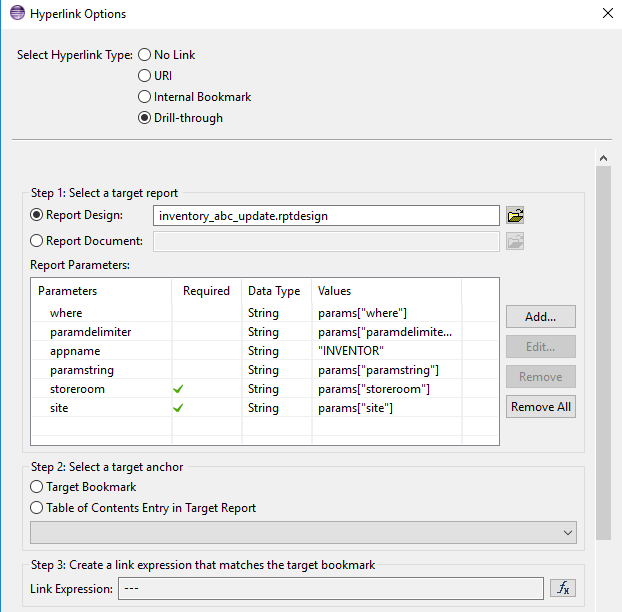
The HTTP session ties the pending changes to the application-server session. That makes session expiry, cluster routing, repeated clicks and abandoned report runs part of the design. Test those cases rather than assuming the array will always be present once and only once.
Build the pending updates
As the first report fetches each row, it obtains the request and session, retrieves the current statement array, and creates the array on the first iteration:
var request = reportContext.getHttpServletRequest();

if (BirtComp.notEqual(request, null)) {
  var session = request.getSession();
  var updStmtList = session.getAttribute(attkey);

  if (BirtComp.equalTo(updStmtList, null)) {
    updStmtList = new Array();
  }

  var updateQuery =
    "UPDATE INVENTORY SET INVENTORY.ABCTYPE = '" +
    abcafter +
    "', INVENTORY.CCF = " +
    ccfafter +
    " WHERE " +
    params["where"] +
    " AND (INVENTORY.ABCTYPE NOT IN ('N', 'NA') OR INVENTORY.ABCTYPE IS NULL) " +
    " AND INVENTORY.ITEMNUM = '" +
    maximoDataSet.getString("itemnum") +
    "' AND INVENTORY.ITEMSETID = '" +
    maximoDataSet.getString("itemsetid") +
    "'";

  updStmtList.push(updateQuery);
  session.setAttribute(attkey, updStmtList);
}
No database update has happened at this point. The code has assembled SQL strings and placed them in the session under attkey.
The example concatenates values and a runtime where clause directly into SQL. Preserve that behavior only when maintaining the standard report and after reviewing exactly where every value originates. For custom statements, use bound parameters for values wherever the report API permits them.
Retrieve the session data
When the user follows the hyperlink, the second report splits paramstring to recover the two session keys:
if (params["paramstring"].value && params["paramdelimiter"].value) {
  var paramlist = params["paramstring"].split(params["paramdelimiter"]);

  if (scriptLogger.isDebugEnabled()) {
    scriptLogger.debug(" >>> paramlist array : " + paramlist.join());
  }

  if (paramlist.length == 2) {
    var attkey = paramlist[0];
    var dskey = paramlist[1];
  }
}
It then retrieves the array of SQL statements:
var updStmtList = mxReportScriptContext.getHttpSessionAttribute(attkey);A production design should handle a missing, expired or already-consumed session value explicitly. It should also remove pending state after a successful operation so refreshing the confirmation report cannot silently repeat the same request.
Execute the transaction
The confirmation report creates one transaction provider, adds every statement and calls save() once:
if (updStmtList != null) {
  var updTxn = MXReportTxnProvider.create(dsName);

  for (var i = 0; i < updStmtList.length; i++) {
    var updStmt = updTxn.createStatement();
    updStmt.setQuery(updStmtList[i]);

    if (scriptLogger.isDebugEnabled()) {
      var statementNumber =
        " >>> updStmt #" + (i + 1) + " of " + updStmtList.length;
      scriptLogger.debug(statementNumber);
    }
  }

  if (scriptLogger.isInfoEnabled()) {
    scriptLogger.info(" >>> updTxn ready to be saved");
  }

  updTxn.save();
  status = "update_success";

  if (scriptLogger.isInfoEnabled()) {
    scriptLogger.info(" >>> updTxn success");
  }
}
Reduced to its essential calls, the transaction pattern is:
var updTxn = MXReportTxnProvider.create(this.getDataSource().getName());
var updStmt = updTxn.createStatement();

updStmt.setQuery(updStmtList[i]);
updTxn.save();
IBM's report developer guidance also documents parameter binding. A custom statement should use placeholders for values rather than assembling them inside the SQL string:
var updTxn = MXReportTxnProvider.create(this.getDataSource().getName());
var updStmt = updTxn.createStatement();
var updateSql =
  "UPDATE INVENTORY SET ABCTYPE = ?, CCF = ? WHERE ITEMNUM = ? AND ITEMSETID = ?";

updStmt.setQuery(updateSql);
updStmt.setQueryParameterValue(1, abcafter);
updStmt.setQueryParameterValue(2, ccfafter);
updStmt.setQueryParameterValue(3, maximoDataSet.getString("itemnum"));
updStmt.setQueryParameterValue(4, maximoDataSet.getString("itemsetid"));

updTxn.save();
Parameters protect values; they cannot safely substitute an arbitrary SQL clause such as params["where"]. Any dynamic predicate still needs to come from a trusted, constrained source.
Decide whether a report should own the update
Before reproducing this technique, check whether an action, automation script, escalation, integration process or MBO-based service expresses the business operation more safely. Those approaches can keep Maximo validation, security and audit behavior closer to the update. A BIRT report may still be the correct home when you are deliberately extending a reviewed standard report pattern, but that should be a conscious exception.
At minimum, verify all of the following in a non-production environment:
- Only authorized groups can run both reports.
- The confirmation page shows exactly what will change.
- Values are bound as parameters and dynamic SQL fragments are constrained.
- A failed statement rolls back the complete intended unit of work.
- Refreshing or reopening the confirmation report cannot apply the update twice.
- Session expiry and clustered application-server routing fail safely.
- The result is visible in Maximo caches, integrations and audit records as required.
- Database backups and an application-level recovery plan exist before deployment.