
There is no universal value for DB2 transaction-log sizing. A normal interactive Maximo workload, a large integration and a direct data load can each require very different amounts of active log space.
This procedure temporarily removes the LOGSECOND limit in a controlled test environment, runs a representative workload, measures its peak secondary-log use and restores a finite limit with some headroom. It gives you evidence for an initial setting; it does not replace ongoing database monitoring.
Do not run this experiment in production. Infinite active logging can consume the available log and archive storage, and a long transaction can make rollback or crash recovery extremely slow. Use a development or data-load test environment with monitored storage and a recoverable backup.
What the DB2 log settings control
DB2 writes inserts, updates and deletes to transaction logs so an uncommitted unit of work can be rolled back and committed changes can be recovered. With archive logging enabled, those logs also support rollforward recovery from a backup.
The three settings used here are:
LOGPRIMARY: the primary log files allocated for the database.LOGSECOND: additional files allocated when the primary log space is not enough.LOGFILSIZ: the number of 4 KiB pages in each log file.
The Maximo 7.6.1 example uses:
LOGPRIMARY = 20LOGSECOND = 100LOGFILSIZ = 8192
That makes the usable log space represented by each file approximately 32 MiB:
8192 × 4096 = 33,554,432 bytes = 32 MiBDB2 also uses two header pages per physical log file, so IBM's disk-space calculation uses (LOGFILSIZ + 2) × 4096. Use the simpler 32 MiB figure below only to turn the monitored secondary-log space into an approximate number of configured log files.
Investigate SQL0964C before increasing the limit
SQL0964C means the transaction log is full, but a small log configuration is only one possible cause. A long-running or uncommitted transaction can hold the oldest active log and exhaust the available space. Check db2diag.log and the administration notification log for ADM1823E, identify the application holding the oldest transaction and decide whether it should commit, roll back or be stopped.
If the workload genuinely needs more log space, continue in a representative non-production environment. Confirm the current configuration and archive method first:
db2 get db cfg for MAXTST76 | grep -Ei 'LOGPRIMARY|LOGSECOND|LOGFILSIZ|LOGARCHMETH1'On Windows, omit the grep portion. Replace MAXTST76 in every command with your database alias.
Enable infinite active logging temporarily
Connect through the DB2 command-line processor:
db2 connect to MAXTST76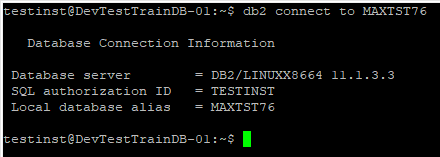
Set LOGSECOND to -1:
db2 update db cfg for MAXTST76 using LOGSECOND -1
This setting requires archive logging: LOGARCHMETH1 must not be OFF. IBM also states that infinite active logging cannot be configured for HADR or DB2 pureScale environments. Stop here if the archive destination is unhealthy, slow or short of space.
Current DB2 documentation describes LOGSECOND as configurable online, but you should still verify that the effective database configuration shows -1 before continuing:
db2 get db cfg for MAXTST76 show detail | grep -i LOGSECONDMonitor both the active log path and archive destination throughout the test. Then run the same data load or large transaction pattern that the environment must support. The result is useful only when the test resembles the real workload.
Measure the peak secondary-log use
Use a database snapshot and filter the output to log-related fields:
db2 get snapshot for database on MAXTST76 | grep -iw logOn Windows, omit grep -iw log and inspect the full output.
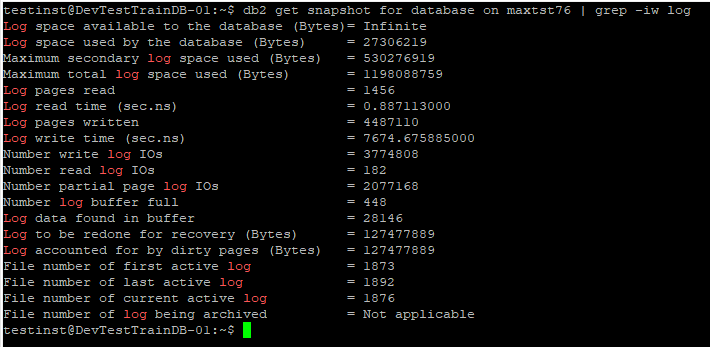
On current DB2 releases, MON_GET_TRANSACTION_LOG exposes the same useful peak as SEC_LOG_USED_TOP, together with the current allocation and total log-space values:
SELECT
  MEMBER,
  SEC_LOG_USED_TOP,
  SEC_LOGS_ALLOCATED,
  TOTAL_LOG_USED,
  TOTAL_LOG_AVAILABLE
FROM TABLE(MON_GET_TRANSACTION_LOG(-2));
In the test, the maximum secondary log space used was 530276919 bytes. Divide that by the usable space in one configured log file:
530,276,919 ÷ 33,554,432 = 15.8Rounding up shows that this run needed approximately 16 secondary log files.
Restore a finite LOGSECOND value
The example selected 20 secondary logs, leaving four files of headroom above the measured peak:
db2 update db cfg for MAXTST76 using LOGSECOND 20
Treat 20 as the result of this example, not a recommendation for every Maximo database. Choose a value from your own peak, concurrency, growth and recovery requirements. Verify the effective setting using SHOW DETAIL, follow your DB2 version's activation requirements, and rerun the representative workload with the finite limit restored.
Continue monitoring log use after release. Workload volumes change, integrations become more concurrent and one unusually large transaction can invalidate a previously comfortable margin.