
Maximo passes the username of the person running a BIRT report through the userName report parameter. You can print that value, use it to retrieve information about the current user, or restrict a query to records associated with them.
This example creates a small report that returns the current user's MAXUSER record. IBM documents the userName parameter for Maximo 7.1.1, 7.5 and 7.6; confirm the behavior in your installed release before relying on it.
Treat
userNameas report context, not as a complete authorization system. Enforce access in the query and through Maximo security. Hiding a report element only changes its presentation and does not prevent its underlying data from being exported.
Create the report and data set
Create a report such as UserTest.rptdesign beneath the appropriate report folder and assign the standard maximoDataSource data source.
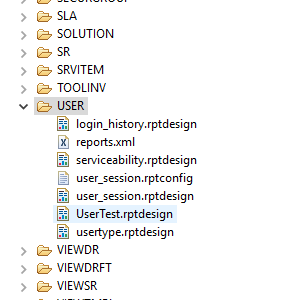
Create a data set called mainDataSet. An unrestricted query would return every Maximo user:
SELECT
  USERID,
  PERSONID,
  STATUS,
  TYPE
FROM
  MAXUSER;
Add a simple table to confirm the data set and its output before applying the filter.

Add the userName parameter
In BIRT Report Designer, add a report parameter named exactly userName. Parameter names are case-sensitive, so username or UserName will not match the value passed by Maximo.
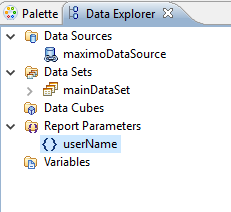
Use the parameter in the data set's Open script. Build the predicate with MXReportSqlFormat.createParamWhereClause so the value is formatted and bound using Maximo's report API rather than concatenated into the SQL:
maximoDataSet = MXReportDataSetProvider.create(
  this.getDataSource().getName(),
  this.getName()
);
maximoDataSet.open();

var sql =
  "SELECT userid, personid, status, type " +
  "FROM maxuser " +
  "WHERE " +
  MXReportSqlFormat.createParamWhereClause(
    "maxuser.userid",
    params["userName"]
  );

maximoDataSet.setQuery(sql);
The query should return one row for the current Maximo user. Keep any further authorization predicates in the SQL so restricted data is never added to the report data set.
Remove the visible request parameter
Import the report into Report Administration. Maximo can add userName to the report's parameter list during import.

Delete the userName entry from the visible parameter list with the trash icon. Leave the parameter in the BIRT design. Removing only the Report Administration entry prevents a request-page field from overriding the contextual username that Maximo supplies silently.
Run the report as several test users. Each execution should return only the MAXUSER row for the signed-in user.

Also test scheduled execution, direct print and any other launch mode the report supports. IBM documents additional handling for userName when using Direct Print with Attachments, so do not assume every execution path supplies context identically.
Other Maximo report context parameters
Traditional Maximo BIRT integrations can provide other contextual parameters. Availability varies by release and report-launch path, so inspect a standard report from your installed version before using them:
| Parameter | Value |
|---|---|
mroApp |
Application configured on the Report Administration record |
baseTable |
Base table of the application |
reportFolder |
Report folder |
reportFile |
Report filename |
reportDesc |
Report description |
reportType |
Report type, such as BIRT or Cognos |
reportNum |
Maximo's internal report number |
appHierarchy |
Source application hierarchy for a duplicated application |
schema |
Database schema |
localTZ |
Maximo server time zone |
fromEmail |
Email address of the user running the report |
mroSite |
User's default insert site |
mroOrg |
User's default insert organization |
locale |
User's locale |
isDuplex |
Value derived from mxe.report.birt.PrintSeparateRecord |
Some legacy environments can also pass SMTP or database connection values through parameters such as smtpHost, ParmUserName, ParmPassword and customrptServerLogonPass. Do not print, log or expose those values in report output. Review whether the report needs them and disable unnecessary credential passing through the report-related system properties supported by your release.