
BMXAA7732W is a warning rather than a fatal error, but it can expose both a performance problem and incorrect condition logic:
BMXAA7732W - If this expression is rewritten it could perform better:
MYTESTFIELD = 1
In a Maximo condition, an attribute from the current MBO must normally be a bind variable. A leading colon tells Maximo to read that attribute from the record being evaluated.
The unbound expression
The example adds a YORN attribute named MYTESTFIELD to the WORKORDER object and uses this condition:
MYTESTFIELD = 1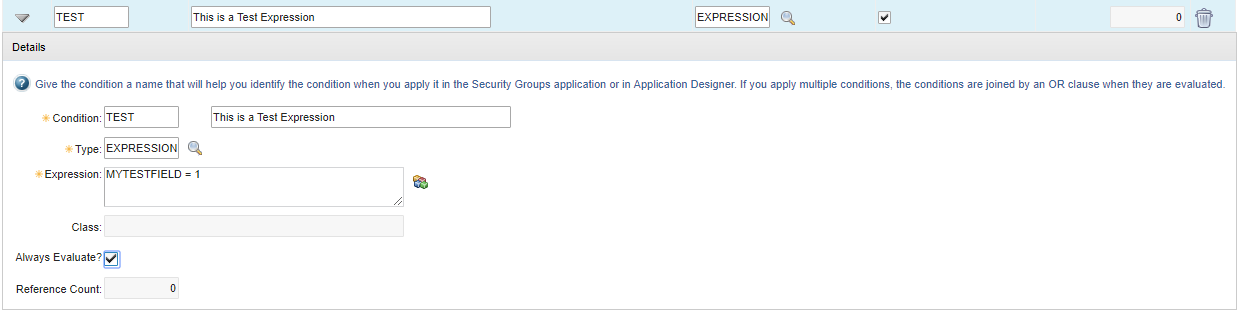
Without the colon, MYTESTFIELD is not a value from the current work order. The Maximo expression parser cannot evaluate it as an MBO bind variable, so it can fall back to asking the database to evaluate SQL.
In the original test environment, the generated query was equivalent to:
SELECT
  COUNT(*)
FROM
  DUMMY_TABLE
WHERE
  EXISTS (
    SELECT
      *
    FROM
      WORKORDER
    WHERE
      MYTESTFIELD = 1
  )
FOR READ ONLY;
The exact fallback SQL varies by database and Maximo release. The important problem is its scope: the subquery asks whether any work order has MYTESTFIELD = 1. It does not test the work order currently open on screen.
That query took 10.727 seconds in the test system. The condition was attached to four fields, so opening one work order took roughly 40 seconds. Those figures describe one environment and are not a general Maximo benchmark.
Bind the current MBO attribute
Add a colon before the attribute name:
:MYTESTFIELD = 1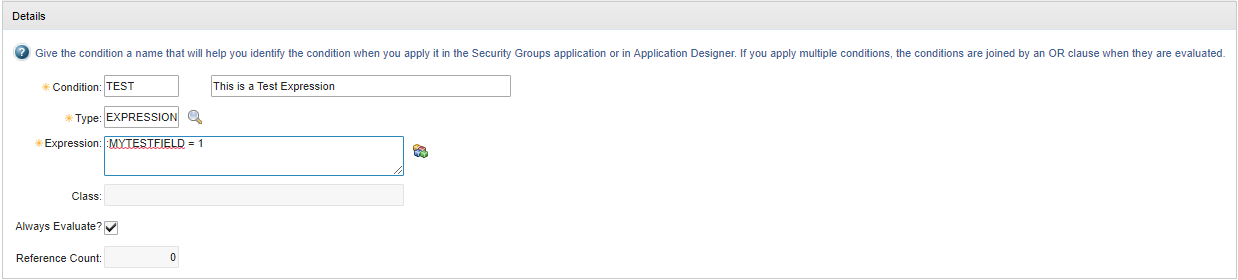
Maximo can now retrieve MYTESTFIELD from the current MBO and evaluate the comparison without querying the whole WORKORDER table.
For a YORN attribute, the symbolic Boolean replacement also makes the intent clear:
:MYTESTFIELD = :YESMaximo resolves :YES as logically true. Use :NO for false. The original numeric expression remains valid for a YORN value, but the symbolic form is easier to read.
Know which side needs the colon
The colon means “resolve this value from the current MBO.” It does not prefix every column in a subquery.
For example:
EXISTS (
  SELECT 1
  FROM workorder child
  WHERE child.parent = :WONUM
    AND child.siteid = :SITEID
)
Here, child.parent and child.siteid belong to rows selected by the database. :WONUM and :SITEID come from the current MBO.
Bind variables can also traverse a Maximo relationship, refer to the owner MBO, or access the original value of an attribute. Use the form that represents the record whose value you actually mean to test.
Find and test affected conditions
When BMXAA7732W appears:
- Capture the condition identifier, expression, object and calling application from the log and configuration.
- Check the condition's reference count and locate every UI control, security rule, workflow or data restriction that uses it.
- Identify unprefixed names that were intended to be current-MBO attributes.
- Rewrite those values as bind variables; do not blindly add colons to SQL columns inside subqueries.
- Test true, false and null values against the correct current record.
- Test every known use of the shared condition because editing it changes all references.
- Compare the logs and response time before and after the change.
Do not assume every database-backed condition is wrong. Conditions that genuinely need EXISTS or another subquery can be valid. The warning is a prompt to check whether the expression can be evaluated directly and whether it refers to the intended record.
If the warning remains after adding the correct bindings, inspect the whole expression for unsupported parser syntax, functions or incomplete SQL. Break complicated business logic into a well-tested condition automation script or condition class when a simple expression is no longer readable.
The exact Maximo release used for this example is unknown. Test the behavior on your installed release before applying it.