
Maximo stops an operation that tries to construct too many records in one MBO set with an error like this:
BMXAA7387E - While attempting to retrieve 5001 of ITEM, the operation was
terminated because the preset limit 5000 was exceeded for retrieving ITEM
into a single set. Reduce the number of selected objects for the operation.
The default fetch stop limit is 5,000 objects. This is a JVM safety control, not an arbitrary query-result setting: each fetched row becomes an MBO in server memory. A sufficiently large set can exhaust the heap and affect every user on that server.
Reduce the set before raising the limit
First identify the operation and why it needs more than 5,000 MBOs. Prefer one of these changes where possible:
- Add a selective
WHEREclause or user filter. - Process records in deterministic batches.
- Fetch only the values needed instead of constructing a large object graph.
- Use a discardable MBO set for a read-only, forward-only process where supported.
- Move genuine bulk work to a cron task or asynchronous job on an appropriate server and run it during a quieter period.
Raising the limit can be reasonable when the larger set is bounded, measured and required. Monitor heap use, garbage collection, database time and execution time under realistic concurrency before promoting the change.
Understand which setting wins
Maximo evaluates these controls at different scopes:
- If
mxe.db.fetchStopLimitEnabledis0, checking is disabled across the system. - If an object is listed in
mxe.db.fetchStopExclusion, that object has no fetch stop check. This exclusion overrides an object-specific limit. - An
mxe.db.fetchResultStopLimit.OBJECTNAMEproperty sets the limit for that object. - Otherwise,
mxe.db.fetchResultStopLimitsupplies the system-wide limit.
Keep mxe.db.fetchResultLogLimit separate in your reasoning. It controls when large-fetch stack traces are logged; it is not the fetch stop limit described here.
Option 1: change the global limit
The system-wide property is:
mxe.db.fetchResultStopLimitChanging it from 5000 to 6000, for example, allows every object without a specific override to construct up to 6,000 MBOs in one set.
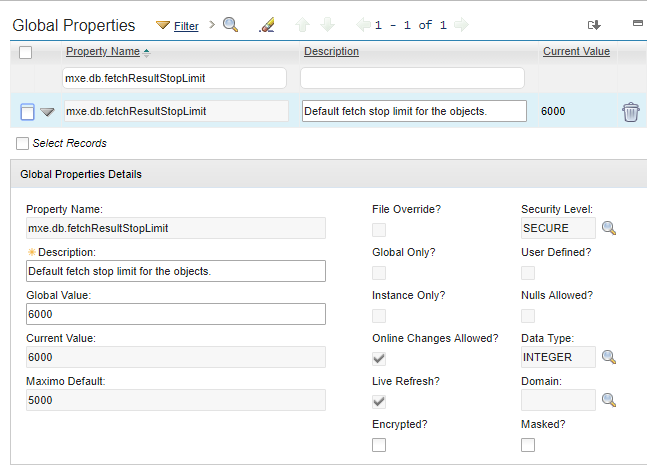
A value of -1 means no limit. Setting mxe.db.fetchStopLimitEnabled to 0 also disables checking globally. Both remove an important heap safeguard and should be avoided in a production system.
Older Maximo releases have had defects involving unlimited values, so verify the behavior and maintenance level of the exact release before using -1. A finite object-specific value is easier to reason about and test.
Option 2: exclude selected objects
mxe.db.fetchStopExclusion contains a comma-separated list of Maximo object names whose fetch stop check is disabled:
mxe.db.fetchStopExclusion=ITEM,INVENTORY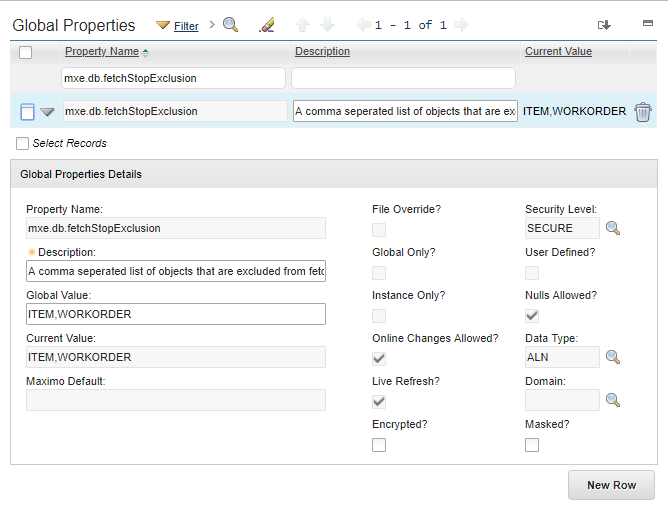
Use object names from MAXOBJECT, not application names or database table aliases. An exclusion has no numeric ceiling and takes precedence over mxe.db.fetchResultStopLimit.OBJECTNAME, so use it only when an unbounded set is intentional and controlled by the calling process.
Option 3: set a finite limit for one object
The safest property change is normally a finite override for the affected object. Append the uppercase object name to the base property:
mxe.db.fetchResultStopLimit.ITEM=6000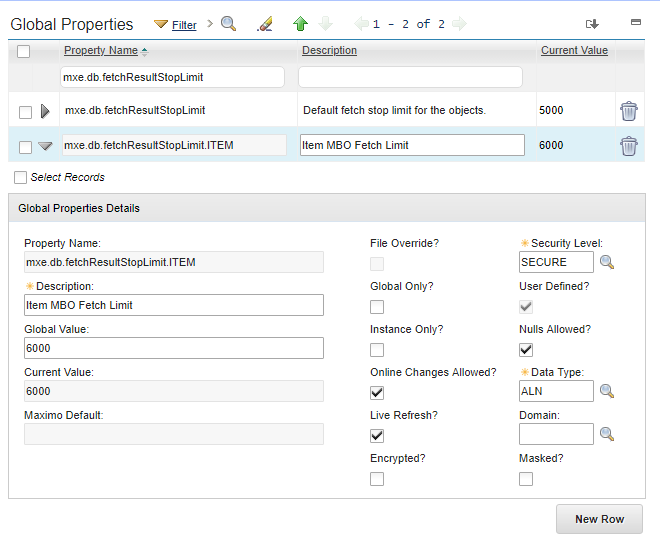
The suffix is the Maximo object name and should be uppercase. This example raises the limit only for ITEM; other objects continue to use the global value.
Before adding the property, confirm that ITEM is not already present in mxe.db.fetchStopExclusion. The exclusion would win and the new limit would never be enforced.
Option 4: change one MBO set in code
Java code and automation scripts can disable the large-fetch protection for one MBO set instance:
myMboSet.setLogLargFetchResultDisabled(true);The unusual spelling of Larg is part of the Maximo API. In Jython the Boolean is written as True:
myMboSet.setLogLargFetchResultDisabled(True)This is narrower than changing an object or system property, but the selected set can still consume excessive memory. Apply a restrictive WHERE clause first, process the records predictably, and close sets that your code opens. Confirm the method in the Java documentation shipped with your Maximo release because internal APIs and behavior can differ between releases.
Do not use this flag merely to silence evidence of an unexpectedly broad query. The method name refers to large-fetch logging, but IBM also documents it as an option when a particular operation must exceed the stop limit.
Apply and verify a property change
In System Configuration → Platform Configuration → System Properties:
- Find or create the narrowly scoped property.
- Set its global value and save it.
- Apply Live Refresh when the property supports it; otherwise restart the affected Maximo servers through the normal change process.
- Repeat the original operation with production-like data and concurrency.
- Check the Maximo logs, JVM heap and garbage-collection behavior.
- Confirm that unrelated objects still stop at their expected limits.
Record why the exception was necessary, the expected maximum set size, the evidence used to choose the value and who owns its review. Data grows, so a value that is safe today can become another hidden failure later.
The exact Maximo release used for these examples is unknown. Verify the behavior on your installed release.