
When developing Java customizations for legacy Maximo, compiled classes need to move from the Eclipse workspace into the correct SMP package tree before you build the EAR. An Eclipse Ant builder can copy each newer class automatically whenever Eclipse builds the project.
This article is a companion to Set up a legacy Eclipse development environment for Maximo. It uses the traditional Maximo Asset Management SMP layout and is intended for a local or isolated development environment.
Point the builder only at a development SMP directory. A save in Eclipse can trigger the copy immediately, so never target production, a shared administrative workstation or a mounted directory used to build another environment. Keep the destination outside source control and verify it before enabling automatic builds.
Create the Ant build file
Add a file named ANTBuild.xml to the root of the Eclipse project. The project declaration gives the build a name, uses the current directory as its base, and selects buildAll as the default target:
<project name="Maximo Class Builder" basedir="." default="buildAll">Define the Eclipse output directory and the two Maximo destinations. maximoInstallDir is supplied by the Eclipse builder so the same file can be used with different development workstations:
<!--Compiled Classes Directory-->
<property name="compiledClasses" value="bin" />
<property
  name="businessObjectsDir"
  value="${maximoInstallDir}\businessobjects\classes"
/>
<property
  name="webClassesDir"
  value="${maximoInstallDir}\maximouiweb\webmodule\WEB-INF\classes"
/>
The first target copies compiled classes into the business objects tree. It excludes packages containing webclient because those classes are handled by the second target:
<!--Copy Up All Newer BO Classes -->
<target
  name="copyBusinessObjects"
  description="Copy Business Object Classes"
>
  <copy todir="${businessObjectsDir}" verbose="true">
    <fileset
      dir="${compiledClasses}"
      includes="**/*.class"
      casesensitive="no"
    >
      <exclude name="**/webclient/**" />
    </fileset>
  </copy>
</target>
The web client target uses the inverse pattern and copies only packages beneath a webclient directory:
<!--Copy Up All Newer Bean Classes -->
<target name="copyWebClasses" description="Copy Web Classes">
  <copy todir="${webClassesDir}" verbose="true">
    <fileset
      dir="${compiledClasses}"
      includes="**/webclient/**/*.class"
      casesensitive="no"
    />
  </copy>
</target>
Finally, the default target calls both copy targets:
<!--Run business objects and web classes copy tasks -->
<target name="buildAll">
  <antcall target="copyBusinessObjects" />
  <antcall target="copyWebClasses" />
</target>
The complete legacy build file is:
<?xml version="1.0" encoding="UTF-8"?>
<project name="Maximo Class Builder" basedir="." default="buildAll">
  <!--Compiled Classes Directory-->
  <property name="compiledClasses" value="bin" />
  <property
    name="businessObjectsDir"
    value="${maximoInstallDir}\businessobjects\classes"
  />
  <property
    name="webClassesDir"
    value="${maximoInstallDir}\maximouiweb\webmodule\WEB-INF\classes"
  />

  <target name="buildAll">
    <fail
      unless="maximoInstallDir"
      message="Pass -DmaximoInstallDir with the target applications/maximo directory."
    />
    <antcall target="copyBusinessObjects" />
    <antcall target="copyWebClasses" />
  </target>

  <!--Copy Up All Newer BO Classes -->
  <target
    name="copyBusinessObjects"
    description="Copy Business Object Classes"
  >
    <copy todir="${businessObjectsDir}" verbose="true">
      <fileset
        dir="${compiledClasses}"
        includes="**/*.class"
        casesensitive="no"
      >
        <exclude name="**/webclient/**" />
      </fileset>
    </copy>
  </target>

  <!--Copy Up All Newer Bean Classes -->
  <target name="copyWebClasses" description="Copy Web Classes">
    <copy todir="${webClassesDir}" verbose="true">
      <fileset
        dir="${compiledClasses}"
        includes="**/webclient/**/*.class"
        casesensitive="no"
      />
    </copy>
  </target>
</project>
The added fail task prevents Ant from running when the destination argument is missing. The package split still depends on the webclient naming convention; adjust the include and exclude patterns if your bean packages use a different structure.
Ant's copy task normally copies a source when it is newer than the destination. The Ant copy task reference documents its timestamp behaviour and file-set options.
Add the Ant builder to Eclipse
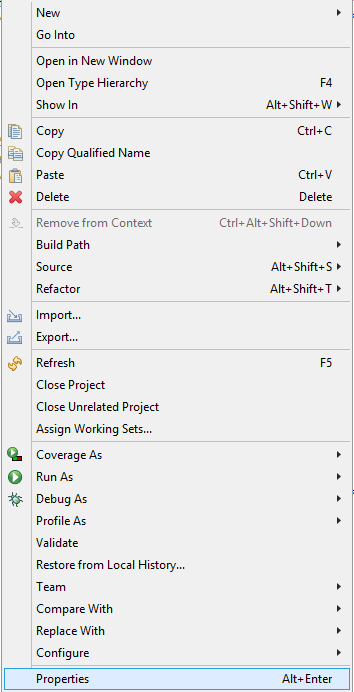
Right-click the Java project, choose Properties, and open Builders.
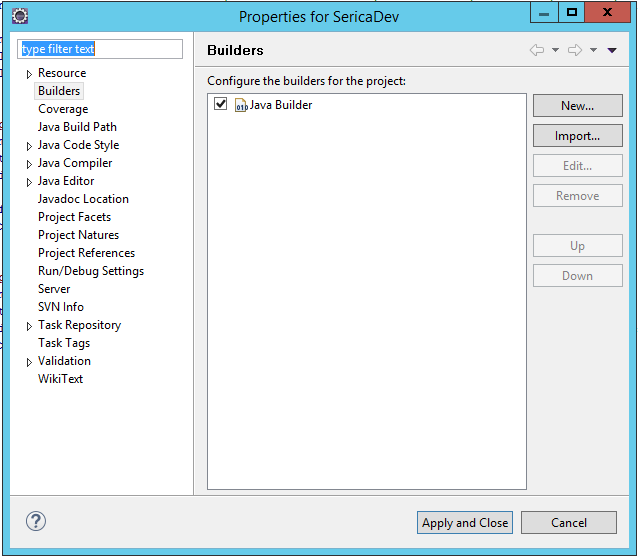
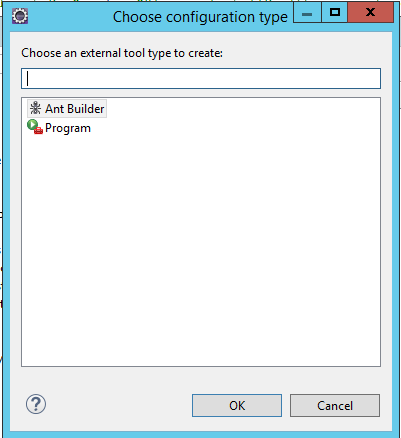
Select New, choose Ant Builder, and continue.
Give the builder a clear name such as Maximo Builder. Set its build file to ANTBuild.xml, then pass the path to the applications\maximo directory on the Arguments field:
-DmaximoInstallDir="D:\IBM\SMP\maximo\applications\maximo"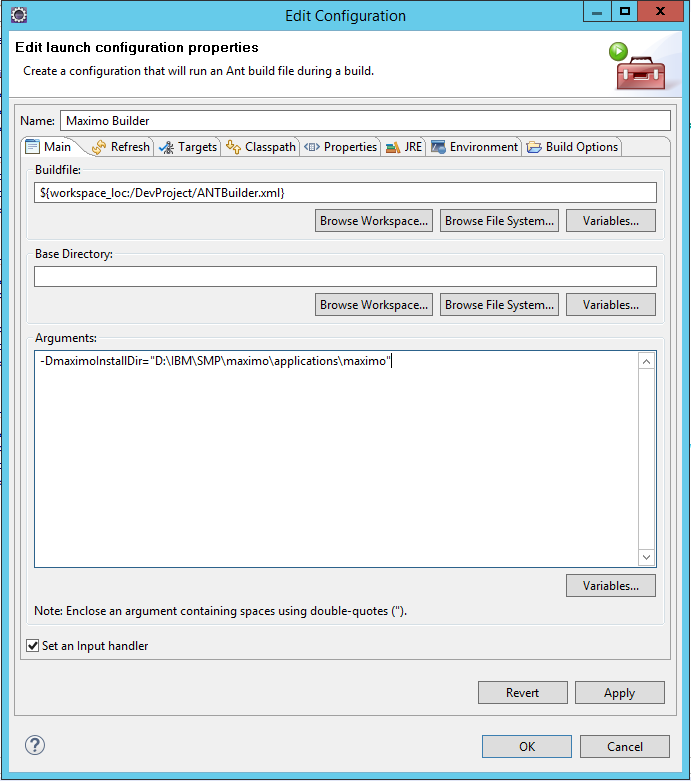
Check the path carefully. It should end at applications\maximo, because the build file adds the business object and web client subdirectories.
Open the Targets tab and assign the default target to Auto Build if you want copying to run when a changed class is saved. You can also enable it for manual builds and after a clean. Do not run the copy target during a clean: Eclipse might have removed the bin output that the target needs.
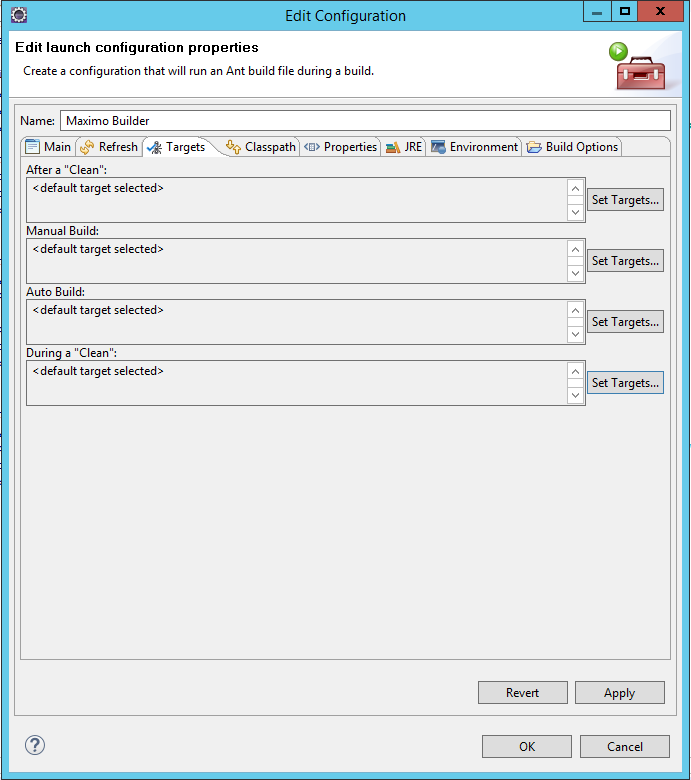
Eclipse's Ant project-builder documentation notes that automatic builders are optional and can affect performance. Keep manual build enabled as a predictable fallback.
Make sure the standard Java builder remains before the Ant builder so Eclipse compiles the source before Ant reads the bin directory. Apply the configuration and close the project properties.
Verify the copy
Change and save a class. The Eclipse console should identify every source and destination class before reporting success:
Buildfile: C:\Users\admin\eclipse-workspace\voynichDevelopment\ANTBuild.xml

buildAll:

copyBusinessObjects:
  [copy] Copying 2 files to D:\IBM\SMP\maximo\applications\maximo\businessobjects\classes
  [copy] Copying ...\bin\com\voynich\test\TestMBO.class to ...\businessobjects\classes\com\voynich\test\TestMBO.class
  [copy] Copying ...\bin\com\voynich\test\TestMBOSet.class to ...\businessobjects\classes\com\voynich\test\TestMBOSet.class

copyWebClasses:
  [copy] Copying 1 file to D:\IBM\SMP\maximo\applications\maximo\maximouiweb\webmodule\WEB-INF\classes
  [copy] Copying ...\bin\com\voynich\webclient\test\TestBean.class to ...\maximouiweb\webmodule\WEB-INF\classes\com\voynich\webclient\test\TestBean.class

BUILD SUCCESSFUL
Total time: 1 second
Confirm the files exist under the expected package paths. Inner and anonymous classes create additional files containing $; the **/*.class pattern copies those too.
The task only copies files. If a class is renamed or deleted from the project, its old .class file remains in the SMP tree until you remove it yourself. Clean stale classes deliberately before the next EAR build.
Copying into SMP does not update a running Maximo server. Rebuild and redeploy the Maximo EAR through the normal controlled process before testing the change. IBM's legacy Maximo deployment procedure documents the EAR build and deployment sequence. Run UpdateDB as well only when the customization includes database scripts or changes that require it.