
Before you begin: this procedure grants database roles and creates or removes DB2 Text Search indexes. Take a database backup, test the operation outside production and allow enough time for it to finish. Do not interrupt
ToggleDB2TextSearchafter confirming the warning prompt.
Maximo can use DB2 Text Search for attributes configured with the Text search type in Database Configuration. Text indexes can make searches against large text columns faster and support linguistic matching, so a search can return related forms of a word rather than requiring a simple wildcard match.
This procedure enables the Maximo indexes when they were not created during installation. It assumes that DB2 Text Search is installed and configured, the Text Search service is running, and the database itself is enabled for Text Search. If multiple DB2 instances share the server, complete the instance and port configuration first.
The exact DB2 and Maximo versions used for this procedure are unknown. Check the utility and its options against the documentation supplied with your Maximo installation.
Grant the DB2 Text Search roles
The Maximo database user needs the DB2 Text Search administrator and manager roles. Run these statements as a DB2 security administrator, replacing MAXIMO if your schema owner uses a different authorization ID:
GRANT ROLE
  SYSTS_ADM
TO USER
  MAXIMO;

GRANT ROLE
  SYSTS_MGR
TO USER
  MAXIMO;
SYSTS_ADM permits database-level Text Search administration, while SYSTS_MGR permits index-level operations. IBM's DB2 Text Search security overview describes the operations granted by each role.
Run ToggleDB2TextSearch
Open a command window or shell and change to Maximo's internal tools directory:
<install-root>\SMP\maximo\tools\maximo\internalOn Windows, run:
ToggleDB2TextSearch.bat -qOn Linux or UNIX, use the shell-script equivalent:
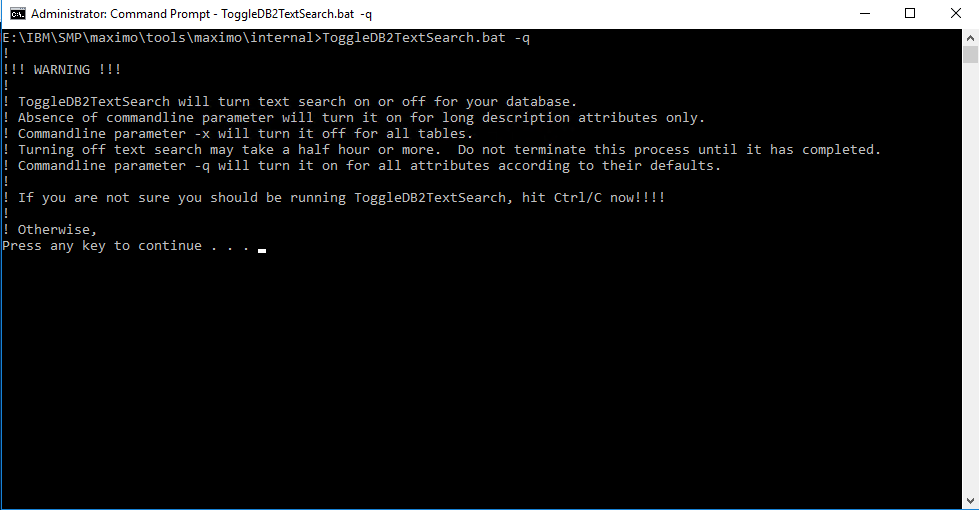
./ToggleDB2TextSearch.sh -qThe -q option turns Text Search on for all attributes according to their Maximo Database Configuration defaults, including configured description and long-description fields.

The tool displays a warning and explains the available modes. Read it carefully before pressing a key to continue.
A successful run processed 266 configured indexes and ended with BMXAA6820I:
BMXAA6818I - ToggleDB2TextSearch started for schema MAXIMO, connected to database jdbc:db2://DEVSERVER:50005/maxprod
... processing index: LXIL1 for table: LONGDESCRIPTION
... processing index: AD0 for table: ACTCI
... processing index: AD1 for table: ACTION
...
... processing index: WD264 for table: WPMATERIAL
... processing index: WD265 for table: WPSERVICE
... processing index: WD266 for table: WPTOOL
BMXAA6820I - ToggleDB2TextSearch completed without errors.
Wait for the completion message rather than assuming that the command has finished when the final index appears. Review any warnings or errors in the complete output before testing search behavior in Maximo.
Other utility modes
Running the utility without an option enables Text Search only for long-description attributes:
ToggleDB2TextSearch.batThe -x option removes Text Search from all configured tables:
ToggleDB2TextSearch.bat -xRemoving the indexes can take 30 minutes or longer, according to the utility's warning. Do not terminate the process before it reports completion.
Verify the result
Confirm that the command completed without errors and that the expected indexes appear in DB2 Text Search administration data. Then test fields configured with the Text search type in Maximo and compare their results with the expected linguistic matching.
Text indexing adds background processing because indexes must remain synchronised with database changes. IBM's search-type guidance recommends using full-text search for large text columns and explains the performance trade-off.