
Message Tracking is useful when an integration fails, but a generated message ID does not tell you which business record produced the message. You normally have to open the payload and find the record yourself.
A publish channel's message-tracking configuration can extract a value from the XML payload and put it in the External Message ID or Search ID field. This example displays the work order's WONUM for messages produced by the standard MXWOInterface publish channel.
The screenshots come from an older Maximo interface, but the same settings remain available in current Maximo Manage releases.
Enable message tracking
Open Integration > Publish Channels, find MXWOInterface and select the Message Tracking action. Select Enable Message Tracking.
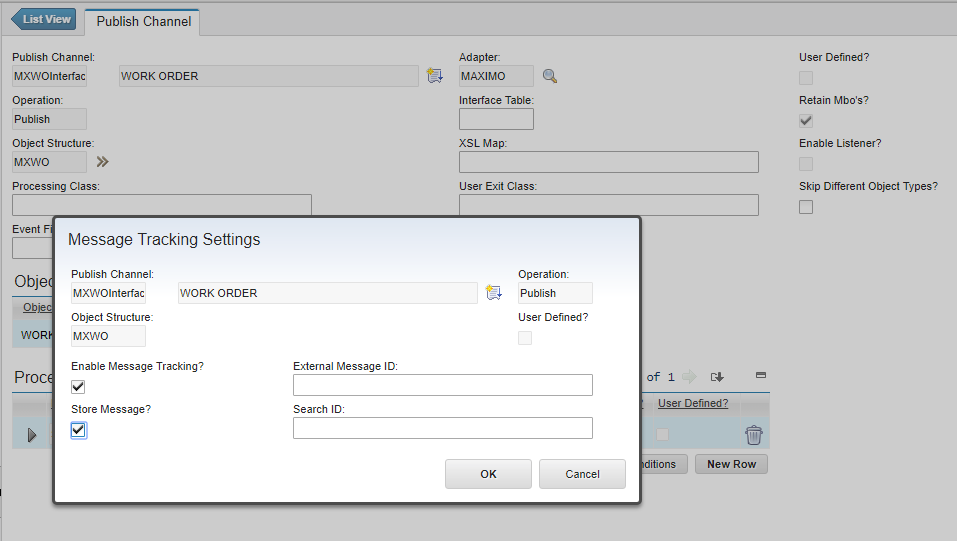
The Store Message option saves the integration payload as well as its tracking details. Enable it only when you need the payload for diagnosis. Stored messages consume database space and can contain operational or personal data, so apply an appropriate retention and access policy.
IBM's message-tracking instructions cover the same settings for outbound publish channels and inbound enterprise services.
Confirm the starting point
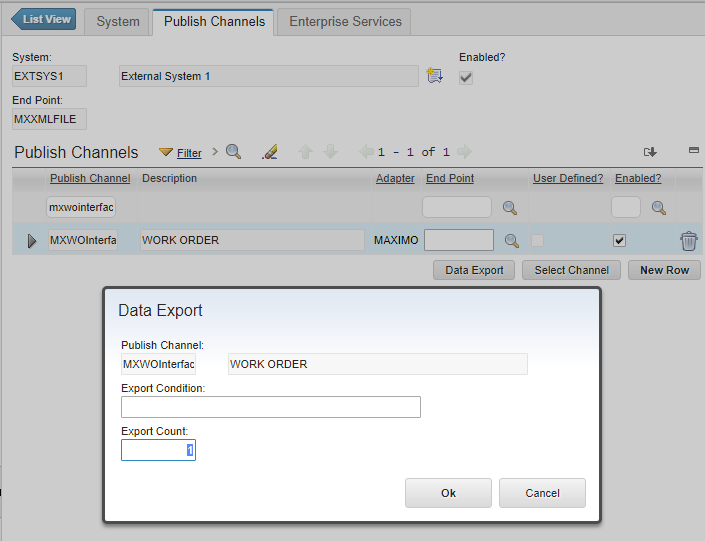
For this example, MXWOInterface is enabled on the EXTSYS1 external system. Use an external system and endpoint intended for testing in your environment; do not assume the sample names or routing are safe in production.
From the external system's Publish Channels tab, select MXWOInterface and run Data Export for a known work order.
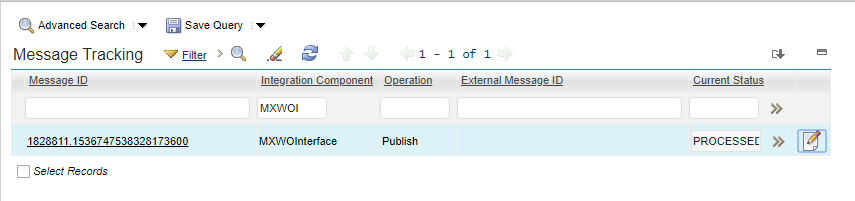
The transaction appears in Message Tracking, but the External Message ID is empty.
Build the XPath from the schema
Back in Publish Channels, generate or view the schema for MXWOInterface. The relevant part of the XML structure looks like this:
<?xml version="1.0" encoding="UTF-8"?>
<max:PublishMXWO xmlns:max="http://www.ibm.com/maximo">
  <max:MXWOSet>
    <max:WORKORDER>
      <max:WONUM>1000</max:WONUM>
    </max:WORKORDER>
  </max:MXWOSet>
</max:PublishMXWO>
The familiar prefixed path to WONUM is:
/max:PublishMXWO/max:MXWOSet/max:WORKORDER/max:WONUMThe max prefix is only a short name declared by xmlns:max. Message Tracking expects the namespace URI on every element in the fully qualified XPath. Replace each max: with {http://www.ibm.com/maximo}:
/{http://www.ibm.com/maximo}PublishMXWO/{http://www.ibm.com/maximo}MXWOSet/{http://www.ibm.com/maximo}WORKORDER/{http://www.ibm.com/maximo}WONUMKeep the leading /. IBM's message-tracking configuration reference uses this fully qualified form and explains how the values are stored in MAXINTMSGTRK.
Add the record key
Open the Message Tracking action for MXWOInterface again and paste the fully qualified XPath into External Message ID.
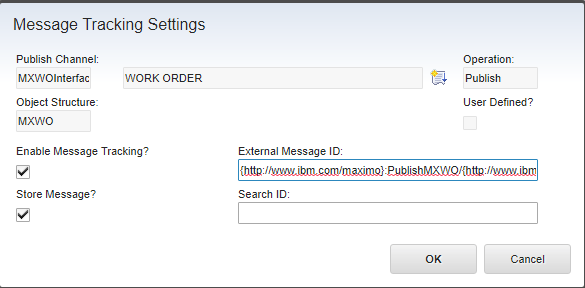
Select OK and save the publish channel. Export another known work order. The resulting transaction now displays its WONUM on the Message Tracking list tab.

The change applies to messages processed after tracking is configured. Existing tracking rows are not repopulated.
Choose an identifier that fits the integration
WONUM makes this example easy to read, but it might not be unique across every site in a Maximo database. Use the identifier that operators actually need, and account for the complete business key where records can repeat between sites or organisations.
The two configurable fields have different jobs:
- External Message ID represents a message's external identifier and is visible on the list shown above.
- Search ID stores values intended for finding related messages efficiently.
IBM allows an XPath to match multiple nodes; Maximo stores the resulting values as a comma-separated list, subject to the database field length. For a multi-site work order integration, consider whether SITEID and WONUM belong in searchable values, or whether the integration already supplies a genuinely unique external message identifier.
Repeat the export with records from each relevant site and inspect both the tracking row and stored payload. Confirm that the chosen values are present for every operation the channel sends, including creates, updates and deletes, before relying on them during incident investigation.