
A table domain can show a much more useful validation error than “the value is invalid.” Maximo supplies the field and rejected value as parameters, so one reusable message can tell a user exactly what failed.
For table-domain validation messages:
| Parameter | Supplied value |
|---|---|
{0} |
The field receiving the value |
{1} |
The value that was rejected |
For example, entering VOYTEST in a field named DOMAINERROR can produce:
Value VOYTEST is not valid for the field DOMAINERROR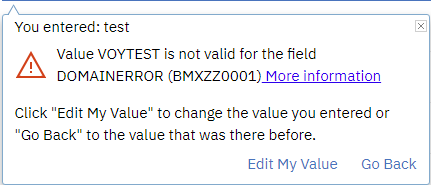
Create the message
Work in a nonproduction environment first. Open Database Configuration, then open the Messages dialog from the application actions.
Create a message with a meaningful group and key. This example uses:
| Setting | Example |
|---|---|
| Message Group | domaintest |
| Message Key | domaintest |
| Display Method | MSGBOX |
| Message ID Prefix | BMXZZ |
| Message ID Suffix | An unused custom suffix |
| Value | Value {1} is not valid for the field {0} |
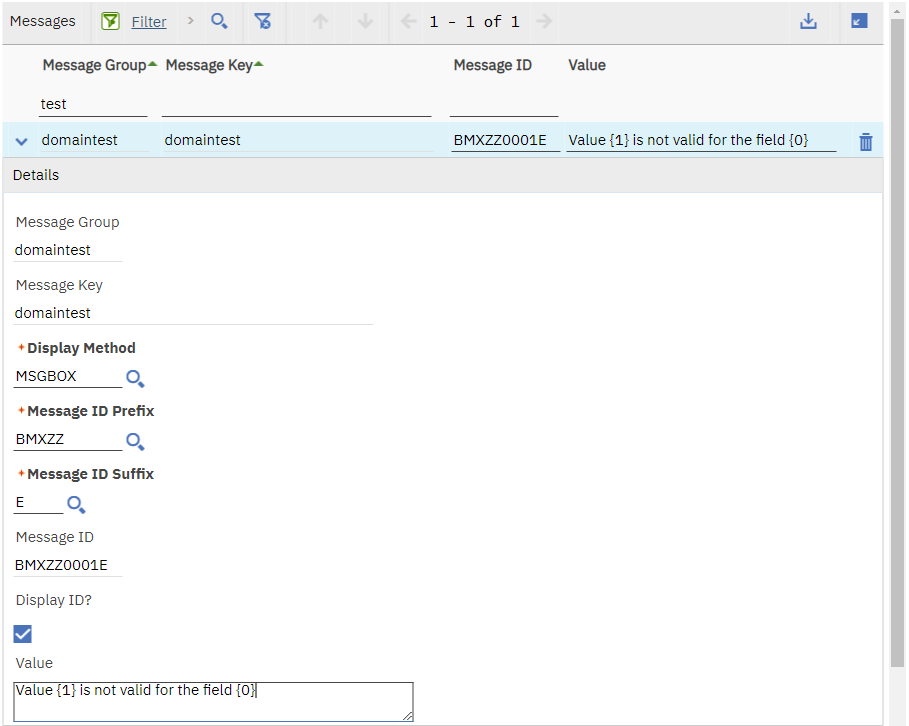
Choose a group, key and message ID that follow your site's naming standard. Do not reuse an existing message ID or edit an IBM-owned message for a custom domain.
Assign the message to the table domain
Open the table domain in the Domains application. On the table-domain row that performs the validation, set:
- Error Message Group to the message group you created.
- Error Message Key to its message key.
Save the domain. The error group and key tell Maximo which message to raise when the validation WHERE clause cannot find a matching record.
The parameter order belongs to the table-domain validation mechanism. Writing the placeholders in a different order changes only how the supplied field and value appear in the sentence. For example:
The value {1} is not valid for {0}. Select a value from the lookup.Test every entry path
Open an application containing an attribute that uses the domain, then test:
- A valid value selected from the lookup.
- A valid value typed manually.
- An invalid value typed manually.
- A mixed-case or whitespace variation if the attribute permits it.
- An integration or import path that validates the same attribute.
The invalid test should show the rejected value in {1} and the field name in {0}. Confirm the message also makes sense in logs and integration responses, where a user might not have the application screen for context.
Keep the message useful without echoing secrets or sensitive submitted data. {1} contains the rejected input, so it is unsuitable for password fields, tokens or other confidential values.