
When you try to enable DB2 Text Search with Maximo's ToggleDB2TextSearch utility, it can stop with:
java.lang.Exception: Text Search is already onThe message can be accurate: Text Search might already be enabled. It can also appear when an earlier enable, disable, database restore or upgrade left Maximo's metadata out of step with the database. In this case, the SEARCHTYPE domain still contained the TEXT value even though Text Search needed to be enabled again.

Do not delete the domain value as the first diagnostic step. First establish whether the row is stale.
Check the current state
Back up the Maximo database and capture the utility output and application log. Then check each layer of the configuration:
- Confirm whether the DB2 Text Search service is installed, configured and running for the correct DB2 instance.
- Confirm whether the database itself is enabled for DB2 Text Search.
- Inspect DB2's Text Search administration views for existing Maximo indexes and their status.
- In Maximo Database Configuration, identify attributes whose search type is Text.
- Check whether the
SEARCHTYPEdomain contains theTEXTvalue.
You can perform the final check without changing data:
SELECT
  DOMAINID,
  VALUE,
  DESCRIPTION,
  ALNDOMAINID
FROM
  ALNDOMAIN
WHERE
  DOMAINID = 'SEARCHTYPE'
  AND VALUE = 'TEXT';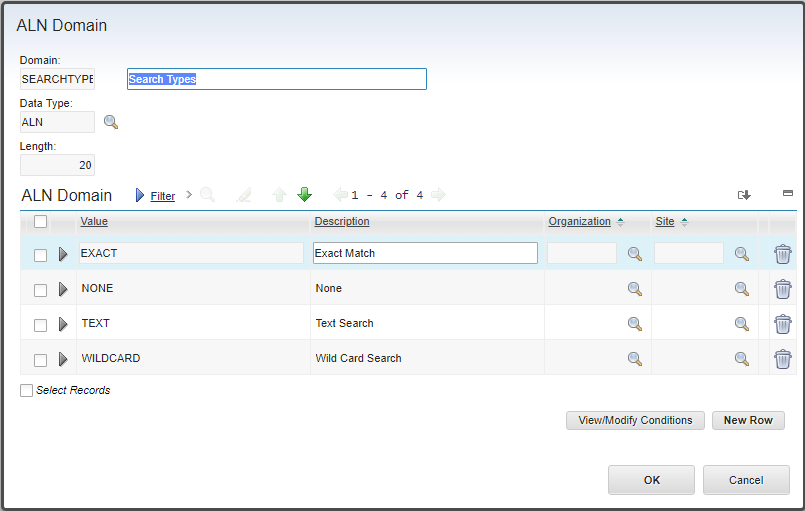
The row by itself does not prove that the system is broken. If the database and expected text indexes are healthy, the utility is correctly preventing a second enable operation. Test a field configured with the Text search type before altering anything.
IBM's search-type configuration reference explains that a Text search type is backed by a database-specific full-text index and that those indexes require ongoing synchronization.
Remove an orphaned TEXT marker
Use this repair only when all of the following are true:
- Text Search needs to be enabled again;
- the expected Maximo text indexes are absent or the previous disable operation removed them;
- the
TEXTdomain value is an orphaned marker; - a tested backup and rollback are available.
In a maintenance window, run the original repair against the Maximo schema:
DELETE FROM
  ALNDOMAIN
WHERE
  DOMAINID = 'SEARCHTYPE'
  AND VALUE = 'TEXT';
Verify that exactly one row is affected before committing. If zero or multiple rows are affected, roll back and investigate the schema and tenant context. Do not delete other SEARCHTYPE values.
After the commit, restart or reload the relevant Maximo metadata cache according to the procedure for your release. Confirm that the Text option is no longer offered as an active search type until the enable utility restores it.
Enable Text Search again
Run the supported enable procedure described in Enable DB2 Text Search for a Maximo database. Allow ToggleDB2TextSearch to complete and look for its successful completion message rather than assuming the indexes were created.
Afterward, verify all three results:
SEARCHTYPEcontains oneTEXTvalue.- The expected DB2 Text Search indexes exist and report a healthy status.
- A known Maximo field configured for Text search returns the expected results.
If index objects already exist, do not repeatedly delete the domain row and rerun the utility. Resolve the database-level index state first. An interrupted operation can leave catalog objects, Maximo metadata and physical indexes disagreeing with each other, and the top-level Java exception does not identify which layer is wrong.
This is a legacy DB2 Text Search recovery procedure. Check the utility behavior against the documentation and fixes supplied with the exact Maximo version before using direct SQL in a current environment.